

iTerm2 3.6.11 for macOS is an advanced terminal emulator for Mac designed for developers, system administrators, DevOps engineers, programmers, and power users who need more control and flexibility than the default macOS Terminal application. The software expands terminal functionality with advanced session management, split panes, search tools, automation features, and extensive customization options that improve command-line workflows.
Working in the terminal is a daily requirement for development, server management, scripting, automation, and system administration. While the default Terminal app handles basic tasks, iTerm2 adds productivity-focused improvements that make managing complex workflows easier. Users can open multiple sessions, split workspaces, configure profiles, automate repetitive commands, search terminal history, and customize appearance and shortcuts to match their workflow. Support for modern terminal features also helps improve efficiency when working with development tools and remote environments.
Version 3.6.11 improves stability and enhances compatibility with recent macOS updates while refining terminal rendering and session responsiveness. Performance improvements make longer terminal sessions feel smoother and reduce interruptions during development work. Users already managing development projects through Visual Paradigm or organizing coding environments with Cherry Studio will likely appreciate the additional workflow control offered by iTerm2. For Mac users who spend significant time inside the terminal, it remains one of the most widely used alternatives available.
Key Features of iTerm2 3.6.11 for macOS
- Split pane support
Work across multiple terminal sessions simultaneously. - Advanced search functionality
Search command history and terminal output efficiently. - Profile customization
Create custom environments with themes and preferences. - Session restoration
Restore previous terminal sessions automatically. - Command automation
Reduce repetitive work using configurable actions. - Enhanced terminal experience
Access features beyond the default macOS Terminal app.
What’s new in iTerm2 3.6.11?
- Improved terminal rendering performance
- Enhanced compatibility with newer macOS releases
- Better split pane workflow responsiveness
- Improved session stability and recovery
- Enhanced search and navigation behavior
- Updated terminal interaction handling
- Improved command processing performance
- Enhanced profile management workflow
- Better memory usage optimization
- Improved long-session reliability
- Updated UI responsiveness and fixes
- Other bug fixes and performance improvements.
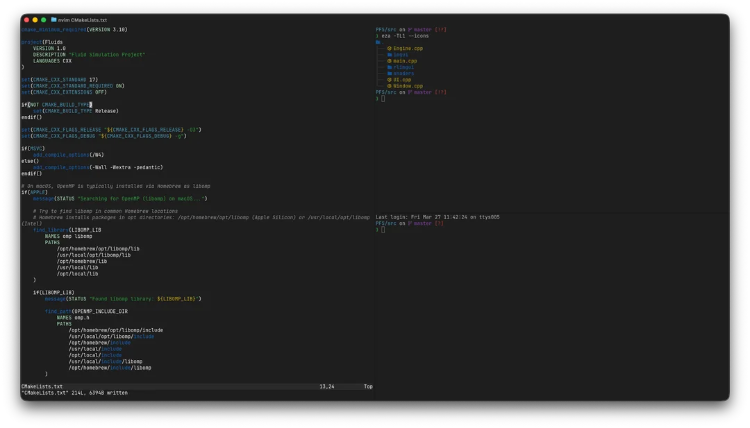
ScreenShots

System Requirements
- Operating System: macOS 13 Ventura or later
- Processor: Apple Silicon or Intel Processor
- RAM: 4 GB minimum
- Storage: 200 MB free space
- Extra: Internet connection optional for remote workflows
Why I Recommend
iTerm2 is useful for users who work inside the terminal regularly and want stronger productivity features than the default macOS option.The split panes and session controls help manage multiple workflows without opening separate windows.Its balance between customization and usability makes it practical for developers, administrators, and advanced Mac users.
Technical Details
- Software Name: iTerm2
- Version: 3.6.11
- Developer: George Nachman
- License Type: Open Source
- Supported OS: macOS
Download Information
Download | Size: 22.90 MB | Pass: Mazterize.net
