

Cherry Studio 1.9.9 for macOS is an AI workspace and productivity application designed for users who work with AI models, writing tasks, research workflows, note organization, programming assistance, and daily productivity activities. The software provides a desktop environment where users can organize conversations, manage AI-assisted workflows, and interact with supported language models inside a cleaner and more focused interface.
Many users who rely on AI tools throughout the day often switch between browsers, notes, documents, and multiple chat windows. Cherry Studio helps simplify this process by bringing AI interactions into one workspace while keeping conversations organized and easier to manage. Users can create structured sessions, save prompts, organize projects, and maintain productivity without constantly moving between tabs and services. The application is useful for writers, developers, researchers, students, and users who frequently work with AI-assisted content.
Version 1.9.9 improves application responsiveness and refines workflow handling for larger workspaces. Conversation management and interface performance have also been optimized to create a smoother experience during longer sessions. Users already organizing writing projects through Scrivener or managing documents with Microsoft Office will likely appreciate the productivity-focused workflow offered by Cherry Studio. For users who want a dedicated AI workspace instead of relying entirely on browser tabs, it remains a practical macOS solution.
Key Features of Cherry Studio 1.9.9 for macOS
- AI workspace management
Organize conversations and productivity workflows inside one interface. - Project organization tools
Group related sessions and content efficiently. - Prompt management
Store and reuse prompts across different tasks. - Conversation history support
Maintain searchable access to previous work sessions. - Desktop-focused workflow
Reduce dependency on browser-based environments. - Productivity optimization
Keep writing, research, and planning tasks organized.
What’s new in Cherry Studio 1.9.9?
- Improved workspace performance and responsiveness
- Enhanced conversation organization tools
- Better handling of larger projects and sessions
- Updated prompt management workflow
- Improved interface navigation and usability
- Enhanced content organization controls
- Better session loading performance
- Improved application stability
- Enhanced export and management features
- Updated compatibility with newer macOS releases
- Optimized overall resource usage
- Other bug fixes and performance improvements.
ScreenShots
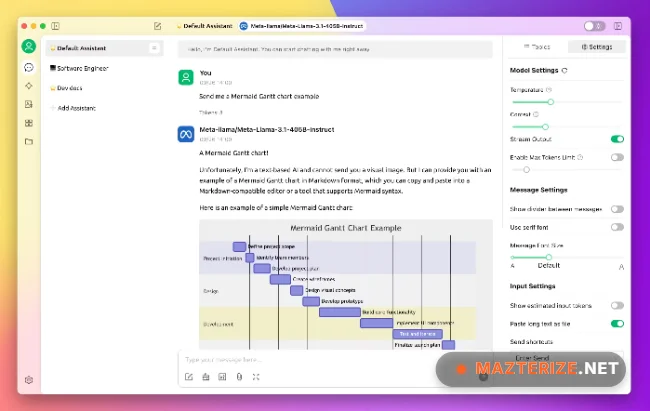
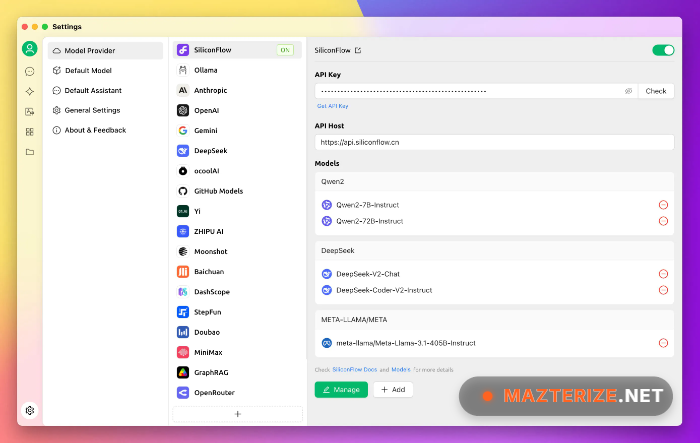
System Requirements
- Operating System: macOS 12 Monterey or later
- Processor: Apple Silicon or Intel Processor
- RAM: 8 GB minimum
- Storage: 500 MB free space
- Internet: Required for AI-related services where applicable
Why I Recommend
Cherry Studio is useful for users who regularly work with AI tools and want a cleaner desktop workflow instead of managing everything through browser tabs.The project organization and prompt management features make long-term workflows easier to maintain.Its lightweight approach also helps keep AI-assisted work more structured and easier to revisit later.
Technical Details
- Software Name: Cherry Studio
- Version: 1.9.9
- Developer: Cherry Studio Team
- License Type: Free
- Supported OS: macOS
Download Information
Download | Size: 176 MB
