

HWiNFO 8.48.5990 is a professional hardware information, system monitoring, and diagnostics utility that provides detailed insights into nearly every component installed in a PC. It is widely used by PC enthusiasts, gamers, overclockers, IT technicians, and system builders who need accurate real-time information about processors, graphics cards, storage devices, memory, sensors, and motherboard components. Rather than displaying only basic system specifications, HWiNFO offers low-level hardware reporting with extensive monitoring capabilities for performance analysis and troubleshooting. Users looking for additional Windows maintenance utilities may also find Teorex FolderIco useful for organizing project folders and system files.
The software supports hundreds of hardware manufacturers and automatically detects CPUs, GPUs, SSDs, HDDs, memory modules, chipsets, sensors, batteries, network adapters, and connected peripherals. Real-time monitoring allows users to watch temperatures, voltages, fan speeds, clock frequencies, power consumption, and system utilization while gaming, stress testing, rendering, or running demanding workloads. This makes it one of the most trusted diagnostic tools for identifying overheating, unstable overclocks, failing hardware, or performance bottlenecks.
Version 8.48.5990 continues expanding support for newly released processors, graphics cards, sensors, and storage controllers while refining hardware detection accuracy and monitoring stability across modern Windows systems.
Key Features of HWiNFO 8.48.5990
- Complete Hardware Detection
Displays detailed information about CPUs, GPUs, motherboards, RAM, storage devices, chipsets, network adapters, and connected peripherals. - Real-Time Sensor Monitoring
Track temperatures, voltages, clock speeds, fan RPM, power usage, and utilization with live sensor updates. - Advanced CPU Information
View processor architecture, cache hierarchy, instruction sets, core frequencies, thermal limits, and processor capabilities. - GPU Monitoring
Monitor graphics card temperature, VRAM usage, GPU clocks, hotspot temperature, power consumption, and fan speed. - SMART Storage Analysis
Read SMART attributes from HDDs, SSDs, and NVMe drives to help monitor storage health. - Customizable Sensor Logging
Record hardware sensor values for benchmarking, troubleshooting, or long-term performance analysis. - Reporting & Export
Generate comprehensive hardware reports in multiple formats for documentation or technical support. - Third-Party Integration
Works alongside applications such as RTSS, MSI Afterburner, Rainmeter, and other monitoring utilities.
What’s New in HWiNFO 8.48.5990?
- Support for New Hardware
Version 8.48.5990 adds detection improvements for recently released processors, graphics hardware, and motherboard chipsets. - Updated Sensor Database
Improved monitoring support for additional onboard sensors and modern hardware controllers. - Enhanced SMART Monitoring
Refinements improve compatibility with newer SSD and NVMe storage devices. - Improved Hardware Reporting
Expanded hardware identification and more accurate reporting across supported devices. - Bug Fixes & Stability Improvements
Includes numerous compatibility updates and reliability fixes based on newly supported hardware platforms.
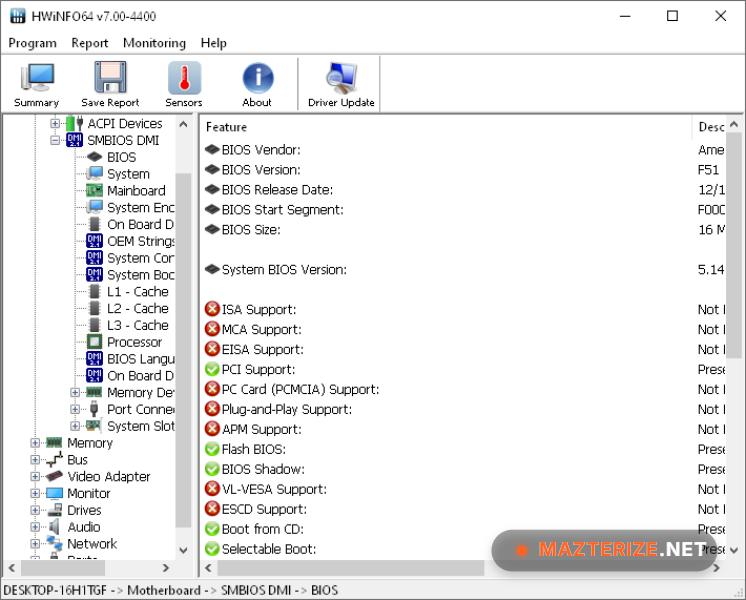
ScreenShots

System Requirements
- Operating System: Windows 10 / Windows 11 (64-bit)
- Processor: Intel or AMD processor
- RAM: 2 GB minimum
- Storage: 50 MB free space
- Extra: Administrator privileges recommended for complete hardware access
Why I Recommend
HWiNFO is one of the first programs I install after setting up a new PC because it provides a level of hardware detail that Windows simply doesn’t offer. Whether you’re checking if memory is running at the correct speed, verifying CPU boost clocks, monitoring GPU temperatures during gaming, or confirming that a new NVMe SSD is operating correctly, HWiNFO presents the information clearly and accurately. It supports an enormous range of hardware, which is one of the reasons technicians and enthusiasts have relied on it for years.
Another reason I recommend it is the quality of its sensor monitoring. When troubleshooting random crashes, thermal throttling, unstable overclocks, or unexpected performance drops, live sensor data often reveals the real cause. You can monitor temperatures, voltages, fan speeds, and power consumption while stress testing or gaming, then export logs to review later. Integration with utilities like MSI Afterburner and RTSS also makes it easy to display hardware statistics on-screen while running demanding applications.
HWiNFO isn’t designed to replace benchmarking or tuning software, but it complements those tools exceptionally well by providing reliable hardware information and diagnostics. Whether you’re building a gaming PC, upgrading components, diagnosing hardware problems, or simply curious about what’s inside your system, HWiNFO remains one of the most dependable monitoring utilities available. Users interested in similar software can browse the complete collection of utilities tools.
You May Also Like
Technical Details
- Software Name: HWiNFO
- Version: 8.48.5990
- Developer: REALiX
- License Type: Freeware
- Supported OS: Windows
Download Information
Download | Size: 19 MB | Pass: Mazterize.net
