

Zotero Latest 2026 is a research and reference management software for Windows designed for students, researchers, academic writers, journalists, and anyone handling large collections of sources, citations, PDFs, and research notes. The software helps organize references, generate citations, save webpages, and manage academic material from one workspace.
A lot of users keep using Zotero because it removes a huge amount of manual citation work during essays, reports, dissertations, and research projects. References can be collected directly from browsers, then organized into folders with tags, notes, and attached PDF files.
The latest 2026 release improves PDF annotation performance and updates browser connector compatibility for newer Chromium and Firefox builds. Library syncing also feels smoother during larger research projects with thousands of references. Users already organizing notes with Typora or managing academic writing through Scrivener will probably settle into Zotero pretty quickly.
Key Features of Zotero Latest 2026
- Reference management system
Store books, journals, articles, webpages, and research sources inside one organized library. - Automatic citation generation
Create citations and bibliographies in APA, MLA, Chicago, and other academic formats. - Browser capture support
Save references and webpages directly from supported browsers with one click. - PDF annotation tools
Highlight, comment, and organize research documents inside the application. - Cloud synchronization
Sync libraries, notes, and references between multiple systems and devices. - Tagging and search tools
Organize large research collections with folders, tags, and advanced search filters.
What’s New in Zotero Latest 2026
- Improved PDF annotation performance
Large research PDFs now open and respond more smoothly during annotation work. - Updated browser connector support
Better compatibility with newer Chromium and Firefox browser updates. - Faster library synchronization
Large research collections now sync more reliably across connected systems. - Enhanced citation handling
Citation generation and bibliography formatting behave more consistently during exports. - Better duplicate detection
The software now identifies repeated references more accurately inside large libraries. - Bug fixes and interface updates
Several crashes and library indexing issues from older builds were corrected.
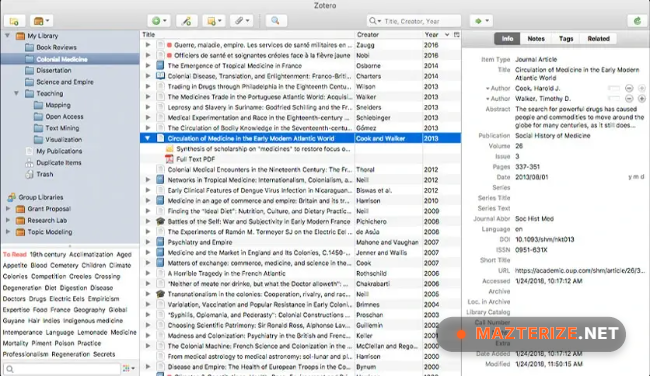
ScreenShot
System Requirements
- Operating System: Windows 10 / Windows 11
- Processor: Intel Core i3 or higher
- RAM: 4 GB minimum
- Storage: 500 MB free space
- Internet: Required for syncing and browser capture features
Why I Recommend
Zotero saves an unbelievable amount of time once research projects start piling up with PDFs, articles, books, and citations everywhere.
The browser capture system also works surprisingly well because references can be saved directly while researching instead of manually entering everything later.
And honestly, automatic bibliography generation becomes hard to live without after using it during larger academic writing projects.
Technical Details
- Software Name: Zotero
- Version: Latest 2026
- Developer: Corporation for Digital Scholarship
- License Type: Full
- Supported OS: Windows
Download Information
Download | Size: 90.77 MB | Pass: Mazterize.net
