

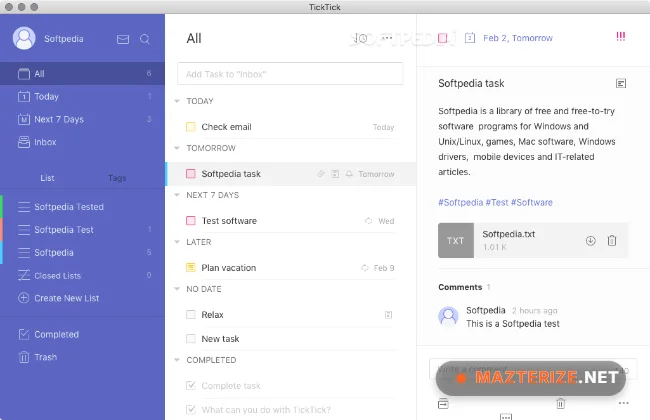
TickTick Premium 8.0.8 is a task management and productivity app for Windows built for people who want a cleaner way to manage daily work, reminders, schedules, and personal planning. A lot of users switch to it because the interface stays simple even after adding dozens of lists and recurring tasks.
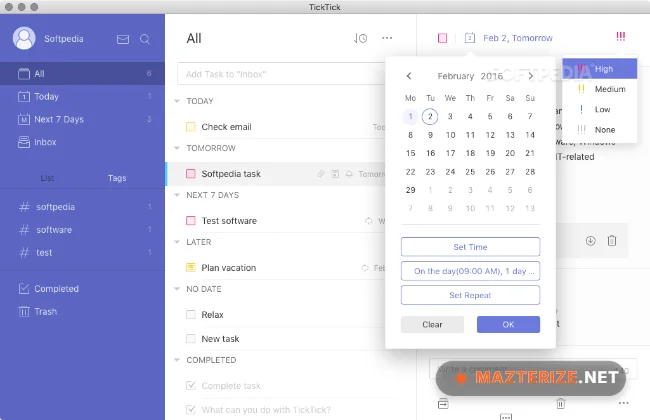
The software combines to-do lists, calendar planning, habit tracking, reminders, focus timers, and collaboration tools in one workspace. Tasks sync across desktop and mobile devices, so updates appear almost instantly between systems. It works well for students, freelancers, remote teams, and people handling busy schedules.
This release improves synchronization speed and fixes several notification problems reported in older versions. The desktop app also feels smoother during larger task imports and long recurring schedules. Users already organizing notes with Notion or managing office work through WPS Office will probably settle into TickTick pretty quickly.
Common Issues & Troubleshooting
- Tasks not syncing correctly
Check account login status and verify internet connectivity on all connected devices. - Desktop notifications missing
Windows notification permissions sometimes disable reminders after updates. - Slow loading with large task lists
Archived completed projects usually improve responsiveness immediately.
Key Features of TickTick Premium 8.0.8
- Task and to-do management
Create projects, reminders, checklists, and recurring schedules. - Calendar integration
View tasks and events together inside one planning system. - Habit tracking tools
Track routines, goals, and daily productivity habits. - Focus timer support
Use Pomodoro-style timers during work or study sessions. - Cross-device synchronization
Sync tasks between Windows, Android, iPhone, and web platforms. - Collaboration features
Share lists and manage tasks with teams or family members.
ScreenShots
System Requirements
- Operating System: Windows 10 / Windows 11
- Processor: Intel Core i3 or higher
- RAM: 4 GB minimum
- Storage: 500 MB free space
- Internet: Required for synchronization and cloud features
Why I Recommend
TickTick works well because it keeps task management simple without removing features people actually use every day.
The combination of reminders, calendar planning, and focus timers makes it useful for both personal productivity and work scheduling.
The app also stays responsive even after building larger task libraries. That matters once projects, recurring reminders, and shared lists start piling up.
Technical Details
- Software Name: TickTick Premium
- Version: 8.0.8
- Developer: TickTick Team
- License Type: Full | Preactivated
- Supported OS: Windows
Download Information
Download | Size: 41.60 MB | Pass: Mazterize.net
