

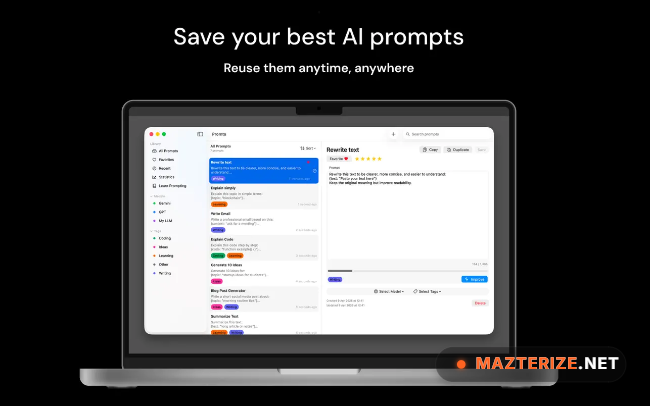
Promta 1.0.5 for Mac is an AI prompt collection and management tool designed for users who regularly work with ChatGPT, Claude, Gemini, Midjourney, and other AI platforms. The software helps organize prompts, reusable instructions, writing templates, and AI workflows inside one searchable workspace.
A lot of users end up collecting prompts in random text files, browser bookmarks, or note apps after using AI tools for a while. Promta keeps everything organized with categories, tagging, search filters, and quick access tools, which makes daily AI workflows feel much cleaner.
Version 1.0.5 improves prompt syncing stability and fixes several interface issues reported in earlier Mac builds. Search performance also feels faster while handling larger prompt libraries. Users already organizing notes through Typora or experimenting with AI workflows using OpenAI Codex will probably fit into Promta pretty quickly.
Key Features of Promta 1.0.5 for Mac
- Prompt organization tools
Store and organize AI prompts using folders, tags, and searchable categories. - Quick prompt management
Save reusable instructions, templates, and workflow prompts for faster access. - Search and filter support
Find prompts instantly inside large prompt collections and libraries. - Clipboard integration
Copy prompts quickly into ChatGPT, Claude, Gemini, and other AI platforms. - Minimal Mac interface
The workspace stays lightweight and clean during longer writing sessions. - Local prompt storage
Manage prompts privately without relying entirely on browser-based tools.
What’s New in Promta 1.0.5 for Mac
- Improved prompt synchronization
Saved prompt collections now sync more reliably between local workspaces. - Faster search handling
Large prompt libraries load and filter more quickly during searches. - Better macOS compatibility
Improved support for newer macOS builds and display scaling behavior. - Updated clipboard integration
Copying prompts into AI platforms now behaves more consistently. - Interface cleanup
Several layout and sidebar responsiveness issues from older builds were corrected. - General stability fixes
The app feels smoother during larger prompt imports and longer sessions.
ScreenShots
System Requirements
- Operating System: macOS 12 or later
- Processor: Apple Silicon or Intel Processor
- RAM: 4 GB minimum
- Storage: 300 MB free space
- Internet: Required for AI platform access and synchronization features
Why I Recommend
Promta becomes useful surprisingly quickly once prompt collections start spreading across notes, chats, and text files.
The tagging and search system saves time during daily AI work, especially when you constantly reuse writing prompts, coding instructions, or workflow templates.
And honestly, having everything inside one dedicated workspace feels cleaner than digging through random documents every time you need an old prompt again.
Technical Details
- Software Name: Promta
- Version: 1.0.5
- Developer: Promta Team
- License Type: Full | Preactivated
- Supported OS: macOS
Download Information
Download | Size: 11.11 MB | Pass: Mazterize.net
