

AltTab 11.0.0 for macOS is a window switching utility designed for Mac users who want a more powerful alternative to the default Command + Tab application switcher. The software brings Windows-style window previews, advanced keyboard navigation, customizable shortcuts, and better multi-window management to macOS. It is particularly useful for power users, developers, designers, remote workers, and anyone who frequently works with multiple applications throughout the day.
While macOS provides a built-in application switcher, it only switches between apps rather than individual windows. This becomes frustrating when several browser windows, documents, terminals, or editing projects are open simultaneously. AltTab solves this problem by displaying live window previews and allowing users to switch directly to the exact window they need. The result is a workflow that feels faster and more efficient, especially during multitasking sessions where dozens of windows may be open at once.
Version 11.0.0 introduces improvements focused on performance, compatibility, and window management behavior across modern macOS releases. Window previews load more smoothly, search functionality feels more responsive, and overall navigation has been refined for users working with large numbers of applications. Users already customizing their macOS experience with MacNotch or managing files through CloudMounter will likely appreciate the productivity benefits offered by AltTab. For users who spend most of their day switching between windows, it can significantly improve workflow efficiency.
Key Features of AltTab 11.0.0 for macOS
- Window-based switching
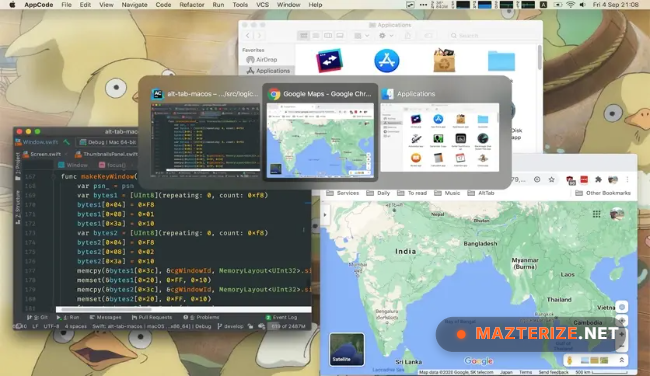
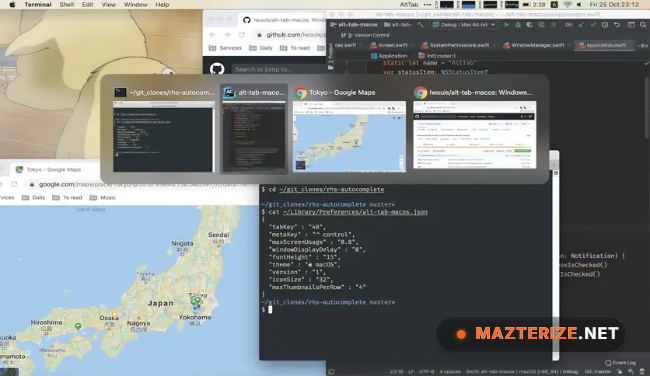
Switch directly between individual windows instead of only applications. - Live window previews
View real-time previews before selecting a window. - Custom keyboard shortcuts
Create personalized shortcuts for navigation and workflow control. - Multi-monitor support
Works efficiently across multiple displays and workspaces. - Search functionality
Quickly locate windows through built-in search tools. - Custom appearance settings
Adjust layouts, preview sizes, and visual behavior to match preferences.
What’s new in AltTab 11.0.0?
- Improved window preview rendering performance
- Enhanced support for newer macOS versions
- Better multi-monitor window handling
- Improved keyboard navigation responsiveness
- Enhanced search and filtering capabilities
- Updated accessibility support
- Better compatibility with full-screen applications
- Improved memory management during heavy multitasking
- Enhanced Mission Control integration
- Updated user interface refinements
- Improved overall switching performance
- Other bug fixes and stability improvements.
ScreenShots
System Requirements
- Operating System: macOS 12 Monterey or later
- Processor: Apple Silicon or Intel Processor
- RAM: 4 GB minimum
- Storage: 100 MB free space
- Display: Standard or multi-monitor configuration supported
Why I Recommend
AltTab solves one of the most common productivity limitations in macOS by making window switching much faster and more precise.
The live previews make it easier to identify the exact document, browser window, or application instance you want to access.
For users who spend hours multitasking every day, the workflow improvement becomes noticeable almost immediately.
Technical Details
- Software Name: AltTab
- Version: 11.0.0
- Developer: lwouis
- License Type: Free
- Supported OS: macOS
Download Information
Download | Size:7.70 MB | Pass: Mazterize.net
