

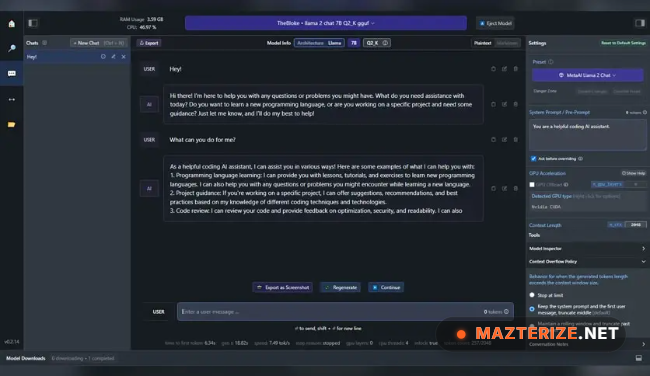
LM Studio Latest 2026 is a local AI model management and desktop chatbot software for Windows designed for users who want to run large language models directly on their own system without relying entirely on cloud-based AI services. The software allows users to download, manage, and chat with local AI models through a clean desktop interface.
A lot of users are moving toward LM Studio because it makes local AI usage much easier compared to setting up command-line tools manually. Models can be downloaded, loaded, switched, and tested from one workspace, which helps a lot during offline AI workflows, prompt testing, coding tasks, and private research sessions.
The latest 2026 release improves model loading speed and updates compatibility for newer GGUF-based AI models. Memory handling also feels smoother during larger model sessions and longer conversations. Users already experimenting with local AI tools through OpenAI Codex or organizing prompts with Typora will probably settle into LM Studio pretty quickly.
Key Features of LM Studio Latest 2026
- Local AI model support
Run large language models directly on your computer without cloud dependency. - Built-in model downloader
Browse, download, and manage supported AI models from one interface. - Offline AI chat workspace
Chat with local AI models privately without sending conversations online. - GGUF model compatibility
Supports modern quantized AI models optimized for local hardware. - Simple desktop interface
Manage models, prompts, and conversations without command-line setup. - Hardware acceleration support
Uses available CPU and GPU resources for smoother AI performance.
What’s New in LM Studio Latest 2026
- Improved GGUF model compatibility
Updated support for newer local AI model formats and quantization methods. - Faster model loading performance
Large models now initialize more smoothly during startup sessions. - Better memory management
RAM handling feels more stable during longer AI conversations and larger prompts. - Updated GPU acceleration handling
Improved compatibility with newer NVIDIA and AMD graphics hardware. - Enhanced chat interface responsiveness
Conversation rendering and prompt handling now feel quicker during use. - Bug fixes and stability improvements
Several crashes and model switching problems reported in older builds were corrected.
ScreenShots
System Requirements
- Operating System: Windows 10 / Windows 11
- Processor: Intel Core i5 or higher
- RAM: 16 GB minimum recommended
- Storage: 10 GB free space or higher for AI models
- Graphics: NVIDIA or AMD GPU recommended for larger models
Why I Recommend
LM Studio makes local AI setup much easier than dealing with terminal commands and manual model configuration every time.
The built-in model browser also helps a lot because downloading and testing different models becomes much faster inside one interface.
And honestly, offline AI conversations feel surprisingly useful once you start working with prompts, coding tasks, or private research sessions regularly.
Technical Details
- Software Name: LM Studio
- Version: Latest 2026
- Developer: LM Studio Team
- License Type: Full
- Supported OS: Windows
Download Information
Download | Size: 582.63 MB | Pass: Mazterize.net
