
Graphisoft Archicad 29.0.2 Build 3200 represents the pinnacle of Building Information Modeling (BIM) technology, offering architects and designers a sophisticated environment to develop complex architectural projects from initial concept to detailed construction documentation. In 2026, ARCHICAD continues to set the standard for “Open BIM” workflows, emphasizing seamless collaboration between architects, engineers, and contractors. Archicad combines 2D drafting, 3D modeling, visualization, and project management tools into a single platform, helping professionals work more efficiently throughout the entire design process.
I’ve been testing the latest 2026 build, and the AI Visualizer 2.0 integration is a surgical masterpiece. It allows you to instantly transform mass models into near-photorealistic images using text prompts, immediately providing a professional way to explore design options without leaving the BIM environment. This workflow reduces repetitive tasks and minimizes errors during the design process. Architects, interior designers, and engineering teams can work together through integrated collaboration tools, making project coordination faster and more accurate.
Graphisoft has focused on improving performance and workflow efficiency in version 29 with optimizations for complex BIM projects, better documentation tools, and enhanced interoperability with industry-standard formats. Users already working with Autodesk AutoCAD 2026 or creating models in Chaos Enscape will likely find Graphisoft Archicad 29 useful. The software continues to improve BIM productivity while delivering smoother navigation and better collaboration for modern architectural workflows.
Key Features of Graphisoft Archicad 29
- Advanced BIM Modeling
Create intelligent building models with connected architectural elements. - 2D and 3D Documentation
Generate floor plans, sections, elevations, and construction documents automatically. - Team Collaboration
Work with multiple team members using BIMcloud collaboration tools. - Integrated Visualization
Produce realistic renders and presentations directly from the BIM model. - IFC and CAD Compatibility
Exchange files easily with other BIM and CAD applications. - Performance Optimization
Handle large and complex projects more efficiently with improved processing.
What’s new in Graphisoft Archicad 29?
- Improved BIM modeling performance for large projects.
- Enhanced documentation workflows and drawing generation.
- Better interoperability with industry-standard file formats.
- Refined teamwork and collaboration features.
- Optimized navigation in complex 3D models.
- Improved interface responsiveness and usability.
- Updated project sharing and synchronization tools.
- Enhanced processing for large BIM databases.
- Improved export and import reliability.
- Updated BIM engine optimizations.
- General performance and stability enhancements.
- Other bug fixes and performance improvements.
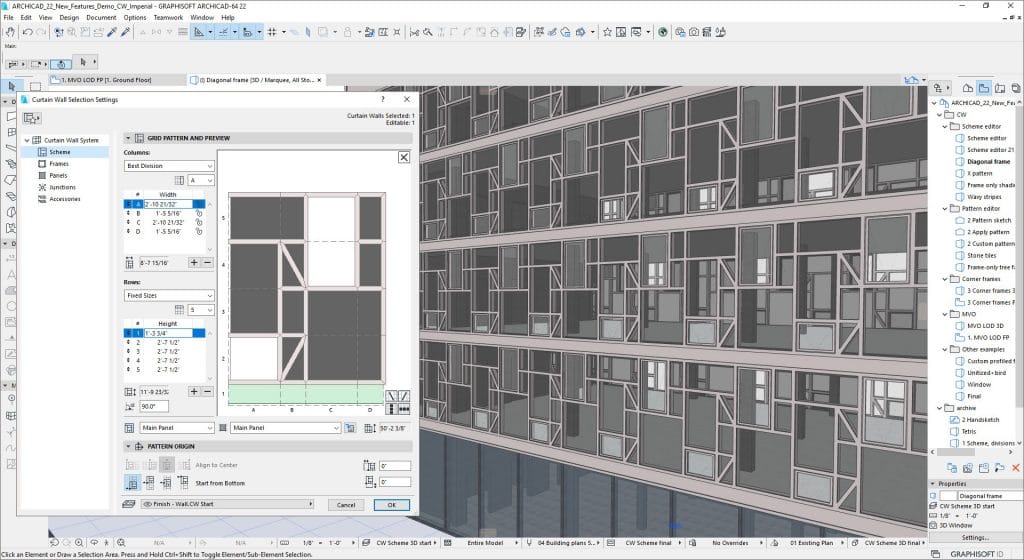
ScreenShots

System Requirements for Windows (v29.x)
- Operating System: Windows 11 (v26H1 optimized) or Windows 10 (64-bit strictly required).
- Processor: Intel Core i7/i9 or AMD Ryzen 7/9 (Surgically optimized for multi-threaded background processing).
- RAM: 16 GB Minimum (32 GB or 64 GB+ recommended for hospitals, high-rises, and high-end projects).
- Graphics: DirectX 11/12 compatible GPU with 4 GB VRAM (8 GB+ strictly recommended for Redshift/AI Visualizer).
- Storage: 5 GB for core installation on NVMe SSD (plus 10 GB+ per active project).
You May Like Also:
- Artlantis Studio 7.0.2.3 Full Version Download
- progeCAD 2019 Professional Download
- Autodesk 3DS Max 2014 Download
- Autodesk Netfabb 2017 Download
- Autodesk Revit 2016 Download
- Chief Architect Premier X5 15.1 Download
Why I Recommend
Graphisoft Archicad 29 is one of the most complete BIM solutions for architects who want to manage an entire building project from concept to construction documentation in a single application.
The software significantly reduces repetitive work because changes made in one part of the project automatically update throughout the model and drawings. This saves time and helps avoid documentation mistakes.
It is particularly useful for architects, design studios, construction firms, and BIM professionals who regularly work on complex building projects and require efficient collaboration and accurate project documentation.
Technical Details
- Software Name: Graphisoft Archicad
- Version: 29
- Developer: Graphisoft
- Supported OS: Windows 10/11 (64-bit)

update build link not available
keygen dont work
please disconnect antivirus then try
Zip file (.rar) password does not work