

SmartFTP Enterprise is an FTP manager software advanced features that offer the most complete, fast, and safe way to transfer files.SmartFTP offers many basic and advanced features that are reliable and efficient, make this tool suitable for use by the novice and advanced users.
This program allows you to transfer files between your local computer and a server on the Internet very easily and quickly. SmartFTP Enterprise 10.0 brings many changes, including new multi-upload and source items panes, new file monitor list controls, and more. It includes all the essential features of an FTP client, such as files and folders transfers, uploads, downloads, and advanced file management. In addition, it also lets you create queues, monitor transfer speed, and so on. It supports FTP, FTPS, SFTP, Google Drive, OneDrive, Amazon S3, WebDAV, SSH, Terminal client, and much more.
Version 10.0.3320 improves transfer stability, updates cloud integration compatibility, and fixes several synchronization issues reported in earlier releases. Large file uploads are more reliable during unstable network conditions, and multi-connection transfers perform better on high-speed systems. Users who already manage websites using FileZilla Pro or organize remote workflows with Internet Download Manager can integrate SmartFTP Enterprise naturally into the same workflow.
Key features Of SmartFTP Enterprise
- Multiple connections & background transfers
- Manage files from one remote host to another
- Automatically resumes broken transfers
- Manage, backup and synchronize files
- Upload and download files or folders
- Passive transfer and proxy support
- Transferring files in ASCII or Binary
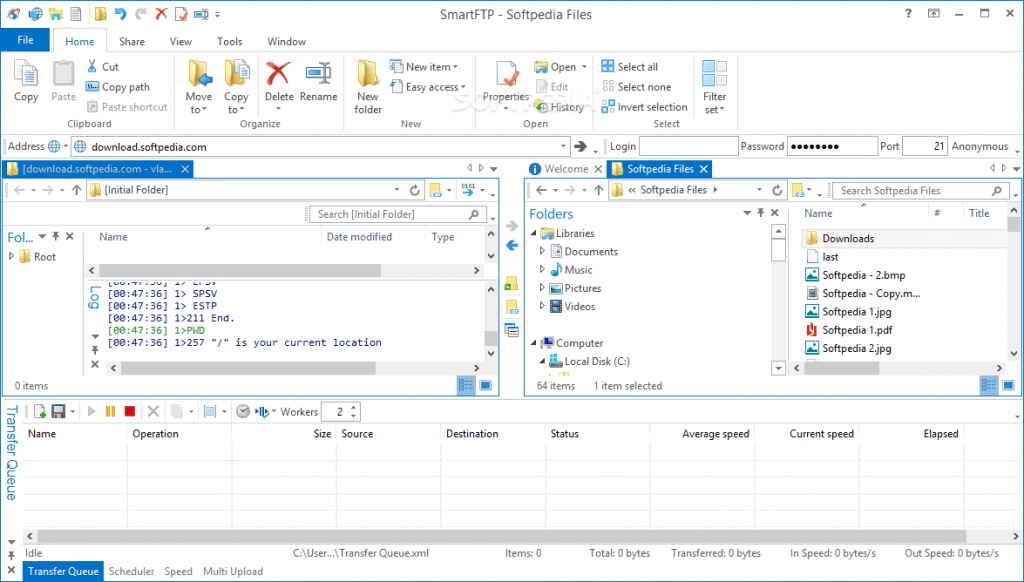
- Supports FTP, FTPS, SFTP, SSH, Cloud, etc.
- Supports drag-and-drop file transfers
- Synchronizing files with a remote folder
- Customizable interface and much more.
What’s new in SmartFTP 10.0:
- Secure FTP and SFTP Transfers
Upload and download files using encrypted transfer protocols. - Cloud Storage Integration
Manage Amazon S3, Google Drive, and WebDAV connections directly. - Directory Synchronization
Keep local and remote folders synchronized automatically. - Multi-Connection Transfers
Handle multiple uploads and downloads simultaneously. - Remote File Management
Edit, organize, and manage server files directly from the client. - Automation and Scheduling
Automate repetitive transfer and synchronization tasks.
Screenshots

Minimum Requirements
- Windows 8.1/ 10 or Server 2008/ 2012/ 2016 (32-bit or 64-bit – all editions)
- Computer with reasonable speed
- 512 MB RAM (1 GB recommended)
- 40 MB free disk space
- Internet connection
Why I Recommend
SmartFTP Enterprise works well because it combines secure file transfers, cloud integration, and synchronization tools inside one organized interface.
The multi-protocol support is especially useful for developers and administrators working across different servers and cloud platforms. Managing remote storage becomes faster and more centralized.
The software also performs reliably during large transfer operations. Upload queues remain stable, synchronization tools work consistently, and transfer management stays responsive during multitasking sessions.
Technical Details
- Software Name: SmartFTP Enterprise
- Version: 10.0.3320
- Developer: SmartSoft Ltd.
- License Type: Full
- Supported OS: Windows
Download Information
Download | Size: 12.20 MB | Pass: Mazterize.net

passwordnya salah terus,
Password is Ok Just Make Sure Dot And Words Are Given Put in That