

DiskBoss 16.7.14 is a disk management and file organization utility for Windows that gives users detailed control over storage analysis, file synchronization, duplicate cleanup, and automated data management. The software is built for users who regularly work with large storage drives, servers, or complex file structures and need better visibility into how disk space is being used.
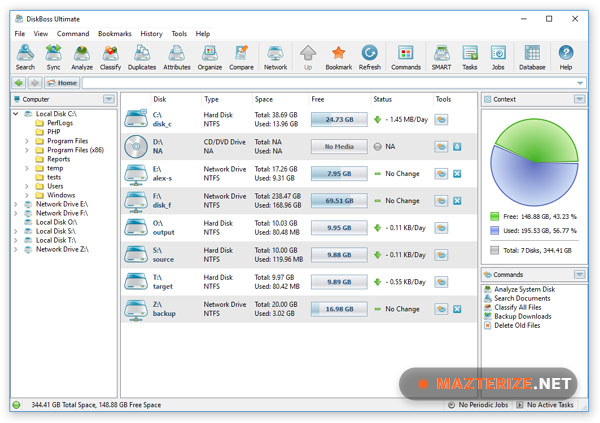
The application combines storage monitoring, file classification, cleanup tools, and automation features inside one interface. Users can scan drives, sort files by type or size, identify duplicate data, and create automated rules for file transfers or cleanup operations. The reporting tools also make it easier to track storage usage across local drives and network locations.
Version 16.7.14 improves scanning speed on SSD storage, updates file synchronization stability, and fixes several Windows 11 compatibility issues. Background operations are more efficient during large directory scans, and memory usage is lower compared to older builds. Users who already organize archives using RAR Extractor Unarchiver Pro or monitor system performance with CPUID HWMonitor can integrate DiskBoss into the same maintenance workflow.
Common Issues & Troubleshooting
- Drive Scan Taking Too Long
Exclude unnecessary directories and disable real-time antivirus scanning during analysis. - Synchronization Errors
Check destination folder permissions and available storage space before syncing. - High Memory Usage During Scans
Reduce the number of parallel operations inside performance settings.
Key Features of DiskBoss 16.7.14
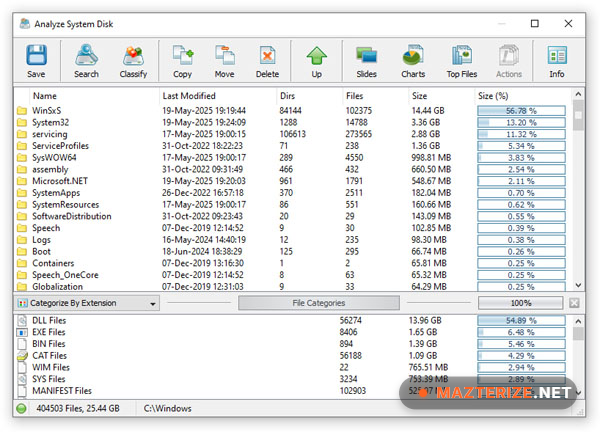
- Disk Space Analysis
Scan storage drives and view detailed file usage reports. - Duplicate File Detection
Find and remove duplicate files to recover storage space. - File Synchronization
Sync folders and directories between local or network locations. - Automated File Management
Create rules for moving, deleting, or organizing files automatically. - Storage Monitoring
Track disk activity and monitor storage changes in real time. - Detailed Reporting
Generate reports for storage usage, file types, and directory statistics.
ScreenShots
System Requirements
- Operating System: Windows 10 / Windows 11
- Processor: Intel Core i3 or higher
- RAM: 4 GB minimum
- Storage: 200 MB free space
- File System: NTFS, FAT32, exFAT supported
Why I Recommend
DiskBoss works well for users who need more control over storage management than standard Windows tools provide. The file analysis system is detailed enough for advanced users while remaining easy to navigate for everyday cleanup tasks.
The duplicate file detection and automation tools save time during large cleanup operations. Instead of manually sorting files across multiple drives, users can create automated rules and manage storage more efficiently.
The software also performs well during large scans. Storage reports load quickly, and background operations remain stable even when working with multi-terabyte drives or network storage systems.
Technical Details
- Software Name: DiskBoss
- Version: 16.7.14
- Developer: Flexense Computing Systems
- License Type: Full | Preactivated
- Supported OS: Windows
Download Information
Download | Size: 36.39 MB | Pass: Mazterize.net
