

Ashampoo WinOptimizer is the ultimate system optimization tool, it offers various tools to maintain and optimize the system, hard disk, security, and more.Ashampoo WinOptimizer covers various tools from system analysis, system maintenance, system tweaking, hard disk cleaners, system recovery, and more. With automatic system performance optimization, it is the best choice to clean, optimize, and protect your privacy. It brings new features to customize privacy as well as windows 10 privacy settings. Whether you’re using your computer for work, gaming, content creation, or everyday browsing, WinOptimizer helps remove unnecessary files, optimize Windows settings, and keep the operating system running efficiently. If you need detailed hardware diagnostics while optimizing your PC, HWiNFO provides real-time monitoring of temperatures, voltages, storage devices, and system components.
Unlike basic cleanup applications that only remove temporary files, WinOptimizer includes a complete collection of maintenance tools covering registry management, browser privacy, startup optimization, duplicate file detection, disk analysis, service management, and secure file deletion.Users can perform one-click maintenance or access individual utilities for more advanced system customization. Those looking for additional Windows management features may also find Yamicsoft Windows 10 Manager useful for deeper operating system configuration and maintenance.
Version 26.00.24 improves compatibility with the latest Windows updates while refining cleanup algorithms, startup optimization, and privacy protection tools. The release also enhances system analysis performance and introduces stability improvements across several maintenance modules.
Key Features of Ashampoo WinOptimizer 26.00.24
- One-Click System Maintenance
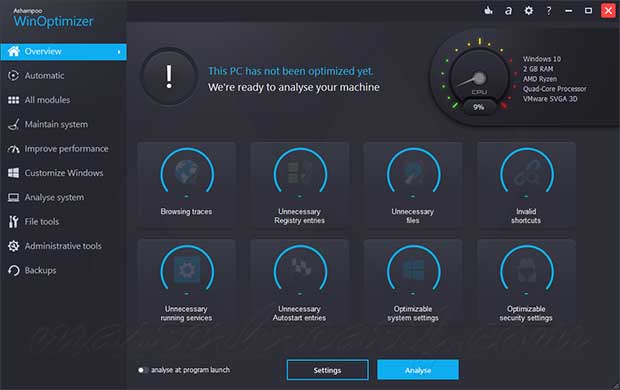
Automatically clean temporary files, browser traces, invalid shortcuts, and unnecessary system data with a single scan. - Registry Optimizer
Detect and remove obsolete registry entries while helping maintain an organized Windows registry. - Startup Manager
Control startup programs, scheduled tasks, and background services to improve Windows boot performance. - Privacy Cleaner
Remove browsing history, cookies, temporary files, recent document lists, and other privacy-related traces. - Disk Space Analyzer
Identify large files and folders that consume storage space to simplify disk cleanup. - Duplicate File Finder
Locate duplicate photos, videos, music, and documents to recover valuable disk space. - Secure File Deletion
Permanently erase sensitive files using overwrite methods that help prevent data recovery. - System Information & Benchmarking
View detailed information about hardware, Windows configuration, installed software, and system performance.
What’s New in Ashampoo WinOptimizer 26.00.24?
- Enhanced Cleanup Engine
Version 26.00.24 improves detection of temporary files, application leftovers, and unnecessary Windows data. - Improved Startup Optimization
Updated startup analysis provides better identification of applications affecting Windows boot performance. - Expanded Privacy Protection
Privacy cleanup modules now recognize additional browser data and Windows activity traces. - Better Windows Compatibility
Enhanced support for recent Windows 10 and Windows 11 updates improves reliability across system maintenance tasks. - General Performance & Stability Improvements
Includes interface refinements, bug fixes, and optimizations throughout the application.
ScreenShots

System Requirements
- Operating System: Windows 10 / Windows 11 (64-bit)
- Processor: Intel Core i3 / AMD Ryzen 3 or higher
- RAM: 4 GB minimum (8 GB recommended)
- Storage: 300 MB free space
- Display: 1366 × 768 resolution or higher
Why I Recommend
Windows naturally accumulates temporary files, browser cache, outdated logs, and leftover application data over time. While Microsoft provides several built-in maintenance tools, they’re spread across different parts of the operating system and don’t always identify every unnecessary file. Ashampoo WinOptimizer brings these maintenance tasks together in one place, allowing users to perform routine cleanup quickly without manually navigating multiple Windows settings. The one-click maintenance feature is especially useful for regular system upkeep, while advanced users can still access individual optimization tools whenever more control is needed.
Another feature I appreciate is the balance between automation and manual control. Instead of forcing every optimization at once, the software separates startup management, privacy cleanup, registry maintenance, secure deletion, disk analysis, and duplicate file detection into dedicated modules. This allows users to target specific issues without making unnecessary changes elsewhere in the system. The inclusion of secure file deletion and storage analysis also makes it useful beyond routine cleanup, particularly when preparing drives for reorganization or protecting sensitive information.
Like any system optimization utility, WinOptimizer should be used thoughtfully, especially when modifying startup entries or registry settings. However, for users looking to simplify regular Windows maintenance while keeping their system organized, it offers a practical collection of tools in a well-designed interface. Users interested in similar software can browse the complete collection of system tools.
You May Also Like
Technical Details
- Software Name: Ashampoo WinOptimizer
- Version: 26.00.24
- Developer: Ashampoo GmbH & Co. KG
- License Type: Premium
- Supported OS: Windows
Download Information
Download | Size: 27.06 MB | Pass: Mazterize.net
