

A Better Finder Rename 12.30 for macOS is a batch file renaming software designed for Mac users who regularly organize photos, videos, music libraries, downloads, and large project folders. The software helps rename thousands of files at once using customizable naming rules, metadata handling, numbering systems, and text replacement tools.
A lot of Mac users still prefer A Better Finder Rename because it handles advanced renaming jobs without forcing people into complicated scripting workflows. The preview system also makes it easier to catch mistakes before applying changes across large file collections.
Version 12.30 improves rename preview responsiveness and updates compatibility for newer macOS releases. Metadata-based renaming also feels more reliable while processing larger media libraries and image collections. The software works especially well for photographers, editors, archivists, designers, and users constantly managing organized file structures.
Key Features of A Better Finder Rename 12.30 for macOS
- Advanced batch renaming
Rename large groups of files and folders using customizable naming methods. - Metadata-based renaming
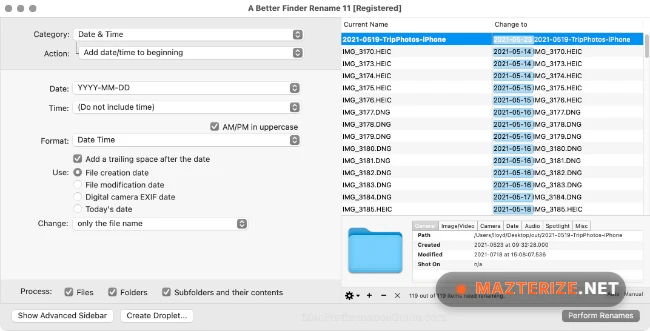
Rename files using EXIF data, creation dates, media tags, and other metadata. - Live preview system
Preview filename changes before applying them to avoid renaming mistakes. - Text replacement tools
Replace, insert, remove, and reformat text across multiple filenames instantly. - Photo and media organization
Organize image, music, and video collections more efficiently. - Finder integration support
Works directly with macOS Finder for faster file management workflows.
What’s New in A Better Finder Rename 12.30
- Improved macOS compatibility
Updated support for newer macOS releases and Finder behavior. - Faster batch processing
Large rename operations now complete more smoothly with bigger file collections. - Enhanced metadata handling
EXIF and media tag detection behave more reliably during renaming tasks. - Updated preview responsiveness
Live rename previews now refresh faster during rule changes. - Better Unicode filename support
Improved handling for multilingual filenames and special characters. - Bug fixes and stability improvements
Several Finder integration and rename preview issues from earlier builds were corrected.
ScreenShots
System Requirements
- Operating System: macOS 11 or later
- Processor: Apple Silicon or Intel Processor
- RAM: 4 GB minimum
- Storage: 200 MB free space
- Display: 1280×800 resolution or higher recommended
Why I Recommend
A Better Finder Rename becomes incredibly useful once file collections start getting too large to organize manually.The preview system also helps a lot because filename mistakes are easy to catch before renaming hundreds or thousands of files at once.And honestly, metadata-based renaming saves a ridiculous amount of time for photo libraries, downloaded media, and archived project folders.
Technical Details
- Software Name: A Better Finder Rename
- Version: 12.30
- Developer: Publicspace
- License Type: Free
- Supported OS: macOS
Download Information
Download | Size: 16.56 MB | Pass: Mazterize.net
