

Little Snitch 6.4.1 is a network monitoring and outbound connection control utility designed for users who want more visibility into how applications communicate over the internet. It is commonly used by developers, privacy-focused users, IT professionals, researchers, and advanced Mac users who prefer controlling network activity instead of allowing applications unrestricted access. The software focuses on showing which applications connect to external services and allowing users to decide what should be allowed or blocked. Users building a broader Mac utility environment may also find Wifilicious useful when managing connectivity and network-related workflows.
Unlike traditional security tools that focus mainly on incoming threats, Little Snitch concentrates on outbound communication. When applications attempt to connect to servers, users can review connection details and decide whether access should be temporary, permanent, limited, or denied. This approach makes it especially useful for users who want to understand background activity, identify unexpected network behavior, or create stricter privacy controls across everyday workflows.
Version 6.4.1 continues refining network monitoring workflows and compatibility across modern macOS environments. Users managing broader device and connectivity workflows may also explore USB Redirector when working across connected hardware environments.
Key Features of Little Snitch 6.4.1 for MacOS
- Outbound Connection Monitoring
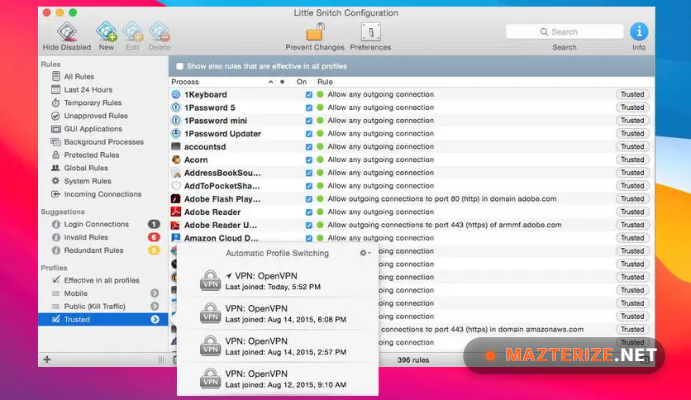
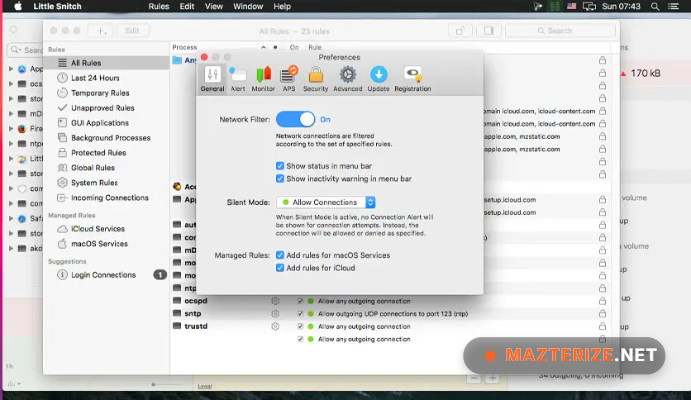
View which applications attempt to access the internet in real time. - Connection Rules System
Allow, deny, or limit application network access using custom rules. - Interactive Network Alerts
Receive prompts when new outgoing connections occur. - Domain & Process Visibility
Inspect destinations, applications, and processes creating traffic. - Network Monitor Dashboard
Visualize active traffic and connection activity. - Profile-Based Configuration
Switch between rule sets for different environments. - Silent Background Enforcement
Apply saved rules automatically after configuration.
What’s New in Little Snitch 6.4.1?
Release notes for Little Snitch 6.4.1 are not yet publicly detailed. This section will be updated when official change information becomes available.
ScreenShots
System Requirements
- Operating System: macOS 13 or later
- Processor: Apple Silicon / Intel Mac
- RAM: 4 GB minimum
- Storage: 300 MB free space
- Extra: Administrator access required for network control features
Why I Recommend
Little Snitch is one of those utilities that becomes more useful after seeing how much background network activity normally happens on a modern system. Many applications connect automatically for updates, analytics, cloud syncing, licensing checks, and telemetry, but users rarely get visibility into those connections. Little Snitch changes that by putting outbound communication in front of the user instead of leaving it hidden in the background.
I also like that it gives control without forcing users into a complicated enterprise firewall setup. During normal use, users can create rules gradually and build a network policy that fits their own workflow. For developers and privacy-conscious users, being able to quickly see which process initiated a connection and where it is going often becomes more valuable than broad network blocking.
At the same time, this is not necessarily software every Mac user needs. Users who prefer completely automatic networking may find the alerts unnecessary at first. But for users who care about transparency, privacy awareness, troubleshooting, or tighter application control, Little Snitch remains one of the most practical Mac networking tools available. Users interested in similar software can browse the complete collection of Mac Software.
You May Also Like
Technical Details
- Software Name: Little Snitch
- Version: 6.4.1
- Developer: Objective Development
- License Type: Premium
- Supported OS: macOS
Download Information
Download | Size: 41 MB | Pass: Mazterize.net
