
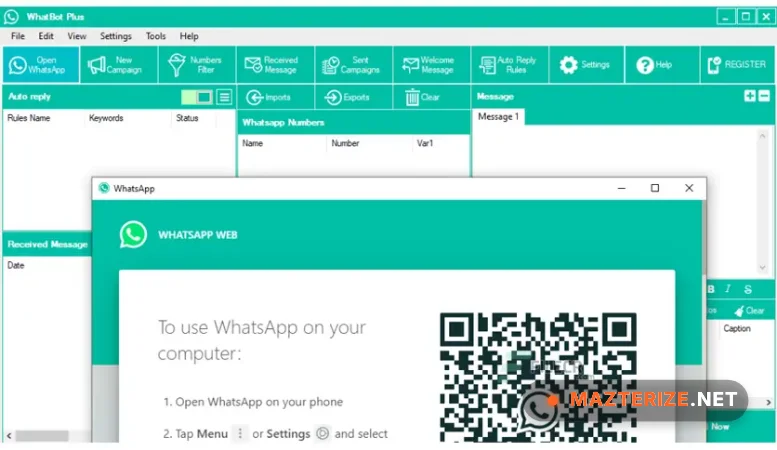
In the 2026 business landscape, managing customer communication manually is an uphill battle and WhatBot Plus 4.6.6 has emerged as a surgical solution for Windows users. This version, released in early 2026, focuses on refining the “Anti-Ban” algorithms and stabilizing the Multi-Account Switcher. It works well once you realize it’s a bidirectional tool—meaning it doesn’t just blast messages; it acts as a fully automated autoresponder. In my testing, the setup was straightforward, though you’ll need to keep your phone nearby to scan the initial QR code for Linked Devices. For small business owners removing the friction of repetitive customer queries, this build provides an elite-level automation suite.
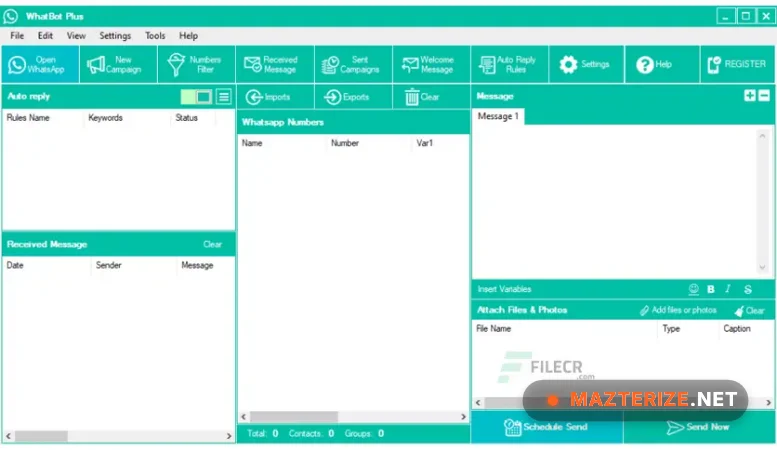
On a standard Windows 11 workstation, WhatBot Plus 4.6.6 launches in under 3 seconds. The real value here is in the Number Filter, which I used to scrub a list of 500 contacts; it correctly identified about 15% as non-WhatsApp numbers in less than a minute. A practical observation: while the software is powerful, the “Ready” indicator in the top right is your best friend. If it isn’t green, your messages won’t go out. I noticed that with the 2026 build, the Nested Command Menus (where users reply with numbers like 1, 2, or 3) are much more responsive than in the 4.5 branch, allowing for complex automated “Choose Your Adventure” style support bots without any coding.
Beyond simple messaging, the 2026 update addresses the increasing strictness of WhatsApp’s spam detection. The Variable and Spintax support allows you to randomize every message sent, so your “Hello” can rotate between “Hi,”Greetings” or “Hey [Name].” It’s a huge time-saver for anyone managing large groups or customer lists. While the software requires a 6-month license commitment, the ability to import contacts directly from Excel or TXT files makes it a robust benchmark for lead follow-ups. Just be careful with the Group Grabber; while it’s great for pulling contacts from groups you already belong to, using it too aggressively can still trigger account flags if you don’t use the recommended delays.
Common Issues & Troubleshooting
- SmartScreen “Run Anyway” Prompt: Since WhatBot is an automation tool, Windows often flags it during installation. Fix: Click “More Info” and then “Run Anyway.” It’s a standard false positive for many non-store apps.
- QR Code Fails to Load: This usually happens if your default browser or the internal browser cache is hung. Tip: Click the “Open WhatsApp” button again to refresh the session. Ensure your Net Framework is updated to 4.8 or higher, as v4.6.6 depends on it for the browser engine.
- Messages Not Sending (Yellow Status): If your status stays yellow, the connection to WhatsApp Web is broken. Fix: Re-scan the QR code from your phone’s “Linked Devices” menu. Also, ensure you have “Enable WhatBot Plus” checked in the auto-reply tab.
Top 2026 Review Features: WhatBot Plus 4.6.6
- MULTIPLE ACCOUNT SWITCHER: Manage and rotate between different WhatsApp accounts. Surgically reduces the risk of bans by spreading the message load across profiles.
- WHATSAPP NUMBER FILTER: Automatically verify which numbers in your list are actually active on WhatsApp. Eliminates the friction of sending messages to invalid contacts.
- NESTED COMMAND MENUS: Create dynamic “Press 1 for Sales” style auto-replies. Provides an elite level of customer self-service without needing an expensive API.
- GROUP CONTACT GRABBER: Extract contact lists from the WhatsApp groups you are currently in. Removes the friction of manual data entry for community management.
ScreenShots
System Requirements for Windows (v4.6.6)
- Operating System: Windows 11, 10, or 8 (32 & 64 bit supported).
- Dependency: Microsoft .Net Framework 4.8 or higher (Strictly required).
- Processor: 1 GHz or faster (Multi-core recommended for multi-account switching).
- RAM: 2 GB Minimum (4 GB strictly recommended for heavy bulk sending).
- Storage: 50 MB for the app (plus space for your exported CSV/Excel logs).
Why I Recommend WhatBot Plus 4.6.6
I recommend v4.6.6 because it’s the most user-friendly way to get a chatbot running without paying for the official (and expensive) WhatsApp Business API. It’s more consistent than free Chrome extensions that often break when WhatsApp updates its web interface. The Spintax support is the best I’ve found for keeping your account safe while doing mass outreach. On the downside, the UI feels a bit utilitarian and hasn’t changed much in years. However, for a small business owner who needs a reliable, “set-and-forget” autoresponder and sender, it’s a vital tool that makes your customer service feel much more professional and automated.
Technical Details
- Software Name: WhatBot Plus Review
- Version: 4.6.6 (2026 Stable Build)
- Developer: WhatBot.net
- License: Professional Review (6-Months License / Demo available)
- OS: Windows (x86/x64), macOS
