
The v3.17 update is a significant stable milestone, officially introducing the 256MB Buffer capacity. On my Windows 11 workstation (NVMe Gen5 SSD), increasing the buffer from the default to 256MB allowed for much smoother sustained transfer speeds, especially when moving thousands of small configuration files that usually “choke” standard copy operations. A practical observation: the Network Recovery Wait function is a genuine lifesaver for NAS users; if your Wi-Fi blips or a cable is bumped, TeraCopy will now pause and wait for the connection to return instead of failing the task. However, keep in mind that the xxHash support is now optimized for SSE2, so even older backup servers can verify file integrity at near-instant speeds without pinning the CPU at 100%.
Beyond the raw speed, the Pro version adds the ability to edit file lists after a copy has started. I found this incredibly useful when I realized I’d accidentally included a 40GB “Temp” folder in a backup—I was able to surgically remove it from the active queue without stopping the rest of the 500GB transfer. While the freeware version is fine for basic use, the Pro license is a must for 2026 workflows because it allows for commercial use and provides HTML/CSV reporting for data auditing. It’s a robust tool that manages the “dirty work” of file verification—including BLAKE3 and SHA-256 hashes—to ensure that what you sent is exactly what arrived on the other end. Just be sure to check the “Verify” box before you start, as it adds a bit of time but provides absolute reliability.
Common Issues & Troubleshooting
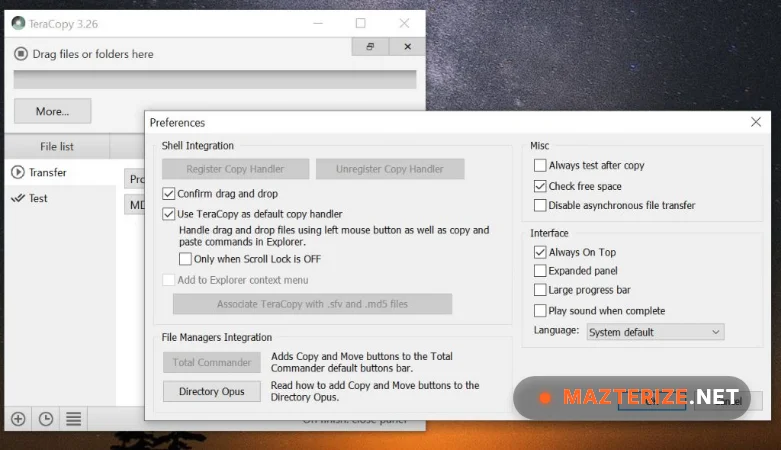
- TeraCopy Not Replacing Explorer: Sometimes Windows 11 updates reset the default file handler. Fix: Open TeraCopy, go to Menu > Preferences, and uncheck/re-check the “Register as default copy handler” box. You may need to restart Explorer via Task Manager for it to stick.
- Slow Speeds on External Drives: If your transfer is crawling at 30MB/s on a USB 3.0 drive, your buffer might be too high or too low. Tip: For external HDDs, try a 64MB buffer; for NVMe to NVMe transfers, push it to the new 256MB limit to maximize throughput.
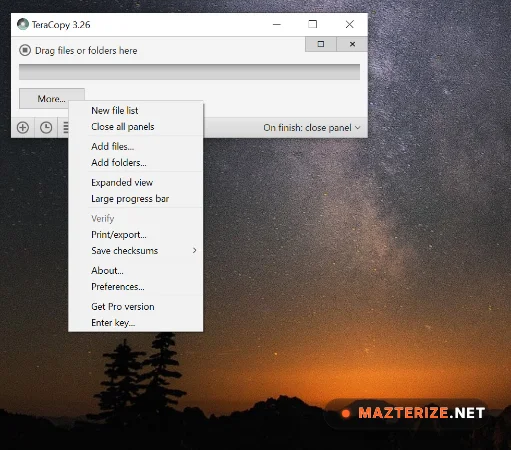
- “Access Denied” on System Files: TeraCopy requires elevated permissions to move certain protected folders. Fix: Click the “More” button in the transfer window and select “Elevate” to grant TeraCopy admin rights for that specific task without restarting the whole app.
Top 2026 Review Features: TeraCopy Pro 3.17
- CLONE & RESCAN: Easily repeat transfers by rescanning the source for new or changed files. Surgically updates your backups without re-copying existing data.
- 256MB BUFFER CAPACITY: Expanded memory usage for high-speed SSD transfers. Eliminates the friction of “bottlenecking” when moving millions of small files.
- NETWORK RECOVERY WAIT: Automatically pauses and retries during network dropouts. Provides an elite level of reliability for unstable NAS or remote connections.
- FILE LIST EDITING (PRO): Remove or add files to the queue while the transfer is active. Removes the friction of having to restart a giant copy task due to one mistake.
ScreenShots
System Requirements for Windows (v3.17 Final)
- Operating System: Windows 11, 10, 8, or 7 (64-bit strictly recommended).
- Processor: Intel or AMD with SSE2 support (Required for xxHash acceleration).
- RAM: 1 GB Minimum (2 GB recommended if using the 256MB buffer).
- Graphics: Standard Windows UI (supports high-DPI scaling for 4K monitors).
- Storage: 15 MB for installation (Plus cache space for large file lists).
Why I Recommend TeraCopy Pro 3.17
I recommend v3.17 because it’s the only tool that gives me “peace of mind” when moving terabytes of client data. It’s more consistent than Windows Explorer because it doesn’t crash the whole UI if a network drive disconnects. The Verify feature is the best I’ve found for ensuring data integrity, especially since it now supports BLAKE3 for ultra-fast hashing. On the downside, the interface remains very compact, which can be hard to read on ultra-wide screens if you don’t adjust the font scaling. However, for any pro who handles large-scale data migrations or daily backups, it’s a vital tool that makes your file operations feel much more professional and secure.
Technical Details
- Software Name: Code Sector TeraCopy Pro Review
- Version: 3.17 Final (Stable 2026 Build)
- Developer: Code Sector
- License: Professional Review (Freeware for personal use / Pro for Commercial)
- OS: Windows (x64), macOS (version 1.0+)
