

Are you tired of sluggish IDEs that struggle with modern C++ standards or make cross-platform deployment feel like a guessing game? Qt Creator 19.0.0 is here to help! This major March 12, 2026, release establishes itself as the ultimate integrated development environment for Qt developers, allowing you to completely manage your C++, QML, and Python projects with surgical precision. Unlike generic text editors, Qt Creator 19.0.0 is built from the ground up for performance, ensuring your build times stay low and your code remains clean. Whether you’re cleaning up complex UI layouts in Qt Design Studio or removing the friction from remote deployments with the new Auto-Detection for build devices, this tool provides a thorough and efficient solution. Ready to keep your development cycle clean and optimized? Download and install Qt Creator 19.0.0 today!
The 19.0.0 update represents a significant leap in developer productivity, officially introducing a native Minimap for text editors to help you navigate massive source files with ease. By utilizing a new Model Context Protocol (MCP) server, the software surgically bridges the gap between your local IDE and AI-assisted coding tools, immediately providing a secure way for AI agents to help build, run, and debug your projects. This version also marks the transition to a mode-based Preferences system, which surgically moves settings from a cluttered dialog to a full-screen mode for better visibility and focus. These refinements, combined with lightweight support for Ant, Cargo, .NET, and Swift, ensure a faster, safer, and more stable coding environment for software engineers in 2026.
Features of Qt Creator 19.0.0
- NATIVE EDITOR MINIMAPS: Surgically provides a high-level visual overview of your code, allowing for rapid navigation through large-scale source files.
- AUTO-DETECTION FOR REMOTE DEVICES: Automatically detects and configures compilers, debuggers, and CMake versions on remote build targets for instant kit creation.
- AI-READY MCP SERVER: Implements the Model Context Protocol surgically, allowing AI assistants to control building, running, and debugging within the IDE.
- LIGHTWEIGHT PROJECT SUPPORT: New support for Rust (Cargo), Java (Ant/Gradle), and .NET, allowing you to open multi-language repositories as workspace projects.
- REWORKED PREFERENCES MODE: Transitioned from modal dialogs to a dedicated Preferences mode, providing a surgical and organized interface for IDE customization.
- ANDROID FILE SYSTEM ACCESS: Integrated device file browsing within the Locator and file dialogs, surgically managing mobile assets as if they were local.
ScreenShots
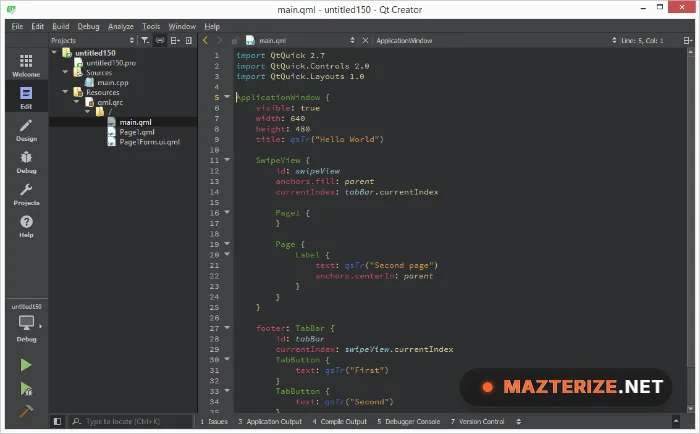
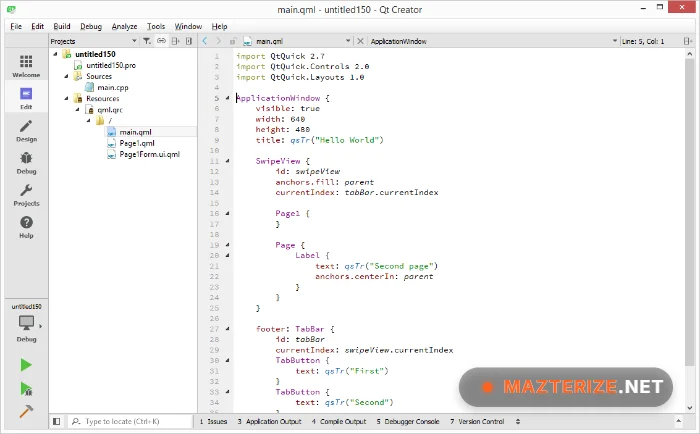
System Requirements for Windows
- Operating System: Windows 10 (1809+) or Windows 11 (x64 and ARM64 supported).
- Processor: 2.0 GHz or faster multi-core CPU (Intel i5/Ryzen 5 or higher recommended).
- RAM: 4 GB Minimum (8 GB to 16 GB recommended).
- Hard Disk Space: 500 MB for IDE installation.
- Graphics: GPU with OpenGL 3.3 or Vulkan support for smooth UI rendering.
Why I Recommend Qt Creator 19.0.0
I’ll be blunt: in 2026, trying to manage cross-platform C++ projects with a collection of fragmented plugins in a generic editor is a waste of your professional time and mental energy. I recommend this software because it is the most robust “Command Center” for the Qt ecosystem—it provides the surgical precision required to move from a desktop concept to a mobile or embedded reality. By using the 19.0.0 release, you gain access to the “Auto-Detection” wizard, which is essentially a “time-saver”—allowing you to surgically set up complex remote kits in seconds rather than hours. Read our review of Uninstall Tool to learn more about keeping your system light. It stands out as the most precise and high-performance C++ IDE available today.
Check out our CLIP STUDIO PAINT EX review and features.
Technical Details
- Software Name: Qt Creator
- Version: 19.0.0
- Developer: The Qt Company
- License: full_version
- Language: Multilingual
- OS: Windows, macOS, Linux
