
Features of Office Tab Pro 18.00
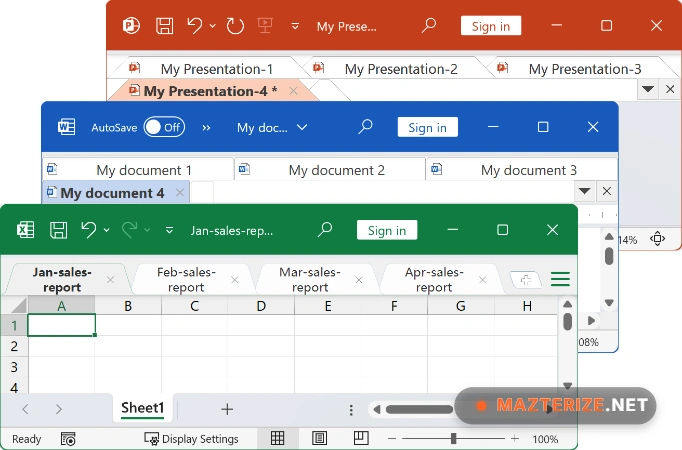
- NEW MODERN TAB BAR STYLE: Sleek UI design for Windows 10/11 that surgically aligns with modern Office aesthetics for a better document-navigation experience.
- FAVORITE GROUP MANAGEMENT: Group relevant Word, Excel, and PPT files together to open or close them as a single entity with one click.
- EXTENDED APP SUPPORT (PRO ONLY): Adds high-performance tabbed interfaces to Publisher, Access, Project, and Visio in addition to standard Office apps.
- SMART TAB CUSTOMIZATION: Surgically customize tab colors, fonts, and positions (top/bottom/side) to match your workflow and monitor setup.
- ONE-CLICK BULK ACTIONS: Use right-click commands to “Save All” or “Close All” open documents instantly, removing manual repetitive tasks.
- INTEGRATED FILE RENAMING: Change document filenames directly from the tab bar without needing to use the “Save As” dialog or closing the file.
ScreenShots
System Requirements for Windows
- Operating System: Windows 11, 10, 8, or 7 (32/64-bit).
- Office Support: Microsoft Office 2003 through 2024 and Microsoft 365.
- Processor: 1.1 GHz or faster, 2-core (Intel i3+ recommended).
- RAM: 2 GB Minimum (4 GB recommended).
- Hard Disk Space: 100 MB for core installation.
Why I Recommend Office Tab Pro 18.00
I’ll be blunt: in 2026, hunting through a buried taskbar to find one specific Excel workbook is a waste of your professional time. I recommend this software because it has evolved from a simple add-on into a mission-critical productivity layer that makes Microsoft Office feel like a modern, 21st-century application. By using the v18.00 release, you gain access to the “Office Tab Center,” which is essentially a “control tower” for your document environment—allowing you to surgically toggle features for each Office app independently. Read our review of Uninstall Tool to learn more about keeping your system light after running heavy suites. It stands out as the most intuitive and stable tabbed manager for Office today.
Explore Microsoft Office Professional Plus 2019 top features in our overview.
Technical Details
- Software Name: Office Tab Pro
- Version: 18.00
- Developer: ExtendOffice
- License: full_version
- Language: Multilingual
- OS: Windows