

AutoCAD Mechanical 2026 is a specialized mechanical design and drafting software built on the AutoCAD platform, developed specifically for mechanical engineers, product designers, manufacturers, and industrial drafting professionals. It extends the core capabilities of AutoCAD with industry-specific tools, standardized parts libraries, intelligent mechanical symbols, and automated drafting features that significantly improve design efficiency. Whether you’re designing machine components, manufacturing equipment, production assemblies, or engineering documentation, AutoCAD Mechanical provides a complete CAD environment for professional mechanical design. Engineers working with advanced mathematical modeling may also find Maplesoft Maple useful for engineering calculations and simulations.
Unlike standard AutoCAD, AutoCAD Mechanical includes more than 700,000 intelligent mechanical parts and components based on international standards, helping designers reduce repetitive drafting work. It also offers automatic BOM generation, hole charts, shaft generators, bearing calculators, welding symbols, tolerance tools, and associative dimensioning to streamline engineering documentation. Users looking for another professional CAD solution can also explore Bricsys BricsCAD Ultimate for advanced drafting and mechanical design workflows.
AutoCAD Mechanical provides a comprehensive set of tools as well as libraries and standard mechanical parts for automating mechanical engineering tasks. By using this software, you will be easy to generate machine components, design and drafting CAD. It has all the tools and features offered on Autodesk AutoCAD 2019, plus tools and libraries to automates the manual processes in the mechanical CAD.
Key Features of AutoCAD Mechanical 2026
- Mechanical Design Toolkit
Access specialized drafting tools created specifically for mechanical engineering and manufacturing projects. - 700,000+ Standard Parts Library
Insert bolts, bearings, nuts, washers, shafts, gears, springs, and other standard mechanical components instantly. - Automatic Bill of Materials (BOM)
Generate and update Bills of Materials automatically as assemblies are modified. - Intelligent Mechanical Symbols
Use standardized welding symbols, surface texture symbols, GD&T annotations, and engineering notations. - Associative Dimensioning
Dimensions update automatically whenever the underlying geometry changes. - Mechanical Calculators
Perform engineering calculations for shafts, springs, bearings, and other machine elements directly within the software. - Standards Compliance
Supports ANSI, ISO, DIN, JIS, BSI, GB, and other international mechanical drafting standards. - DWG Compatibility
Works seamlessly with native AutoCAD DWG files for collaboration across engineering and manufacturing teams.
What’s New in AutoCAD Mechanical 2026?
- Enhanced Drawing Performance
Version 2026 improves responsiveness when editing large mechanical assemblies and complex engineering drawings. - Updated Mechanical Content
Expanded standards libraries include additional intelligent components and updated engineering references. - Improved Collaboration
Better integration with Autodesk cloud services simplifies project sharing and design coordination. - Refined Productivity Tools
Several drafting commands and annotation workflows have been optimized for faster design completion. - General Stability Improvements
Includes maintenance updates, compatibility enhancements, and bug fixes for improved reliability.
ScreenShots

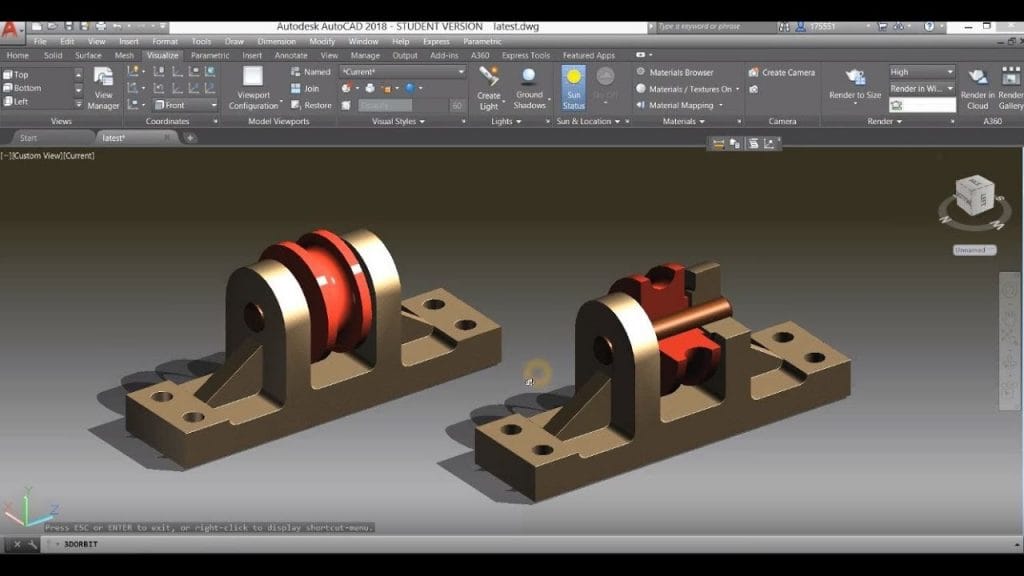
System Requirements
- Operating System: Windows 10 / Windows 11 (64-bit)
- Processor: Intel Core i7 / AMD Ryzen 7 or higher
- RAM: 16 GB minimum (32 GB recommended)
- Storage: 12 GB free disk space
- Graphics: DirectX 12 compatible GPU with 4 GB VRAM or higher
Why I Recommend
Mechanical engineering projects often involve repetitive drafting tasks that can consume valuable design time. AutoCAD Mechanical addresses this challenge by providing intelligent tools specifically developed for manufacturing and mechanical design rather than relying solely on general-purpose CAD features. The extensive library of standard mechanical components, automated Bills of Materials, and associative dimensions significantly reduce manual work while helping maintain consistency throughout engineering projects. These specialized features make the software especially valuable for companies producing machinery, industrial equipment, tooling, and manufacturing documentation.
Another major advantage is its compatibility with the broader AutoCAD ecosystem. Existing DWG drawings can be opened and edited without conversion, while mechanical-specific tools remain available whenever needed. Engineers can quickly generate shafts, springs, bearings, tolerances, welding symbols, and standardized annotations without searching through external libraries or manually recreating components. Combined with improved collaboration features and support for international drafting standards, AutoCAD Mechanical helps engineering teams work more efficiently from initial concept through manufacturing documentation.
Whether you’re designing machine components, factory equipment, mechanical assemblies, or production drawings, AutoCAD Mechanical 2026 provides a comprehensive CAD solution built specifically for engineering workflows. Its automation tools, standards libraries, and manufacturing-focused features make it one of the leading mechanical drafting applications available today. Users interested in similar software can browse the complete collection of graphic design.
You Can Also Download:
Technical Details
- Software Name: AutoCAD Mechanical
- Version: 2026
- Developer: Autodesk, Inc.
- License Type: Commercial
- Supported OS: Windows
Download Information
Download | Size: 3.32 GB | Pass: Mazterize.net
