
If you’ve been looking for a way to experiment with high-end AI art without the recurring cost of monthly subscriptions or the privacy concerns of cloud-based tools, AI Text To Image Generator Pro 1.2.2 is a standout choice for 2026. This version represents a refined, stable desktop environment that brings the power of state-of-the-art models like Flux, Stable Diffusion, and Juggernaut XL directly to your PC. Unlike web-based generators that often throttle your usage or require constant internet access, this Pro build is designed for 100% offline generation once the initial models are set up. Whether you are a digital artist cleaning up a concept piece or a hobbyist removing the friction of complex prompt engineering, this application provides a thorough and efficient solution. Ready to turn your words into visual masterpieces? AI Text To Image Generator Pro 1.2.2 is the professional tool you need.
The v1.2.2 update marks a significant architectural milestone, officially introducing Custom Model Support from the Hugging Face Hub. By utilizing a modernized diffusers-based engine, the software now allows you to import and manage any compatible model, immediately providing a professional-grade range of styles from photorealism to vibrant anime. This version was specifically tuned for Windows 10 and 11, ensuring that NVIDIA CUDA acceleration remains consistent and high-performing during long batch generation sessions. These refinements, combined with a one-click “Recommended Settings” feature, mean the app handles the technical optimization in the background while you focus on your creative prompts.
As someone who works daily with various AI tools on a high-end Windows 11 workstation, I’ve found that the Offline Capable & Private nature of this app is a genuine lifesaver for sensitive projects. It ensures that your prompts and generated images never leave your local machine, which is perfect for maintaining total creative privacy. One thing I noticed is that while the Inference Steps and Guidance Scale (CFG) controls offer deep precision, the generation time is heavily dependent on your VRAM if you’re running with less than 8GB of video memory, you might experience a slower output on the larger Flux models. It’s also worth noting that the initial model downloads can be quite large, so you’ll want a fast connection for the first-time setup. However, once installed, it effectively replaces the need for expensive online credits.
Top 2026 Review Features: AI Text To Image Generator Pro
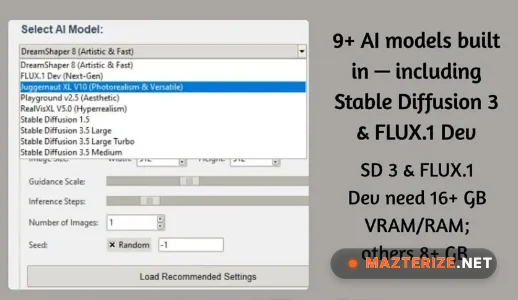
- STATE-OF-THE-ART MODELS: Native access to world-class models including Flux, Stable Diffusion, and Juggernaut XL. This ensures you stay at the cutting edge of AI art quality.
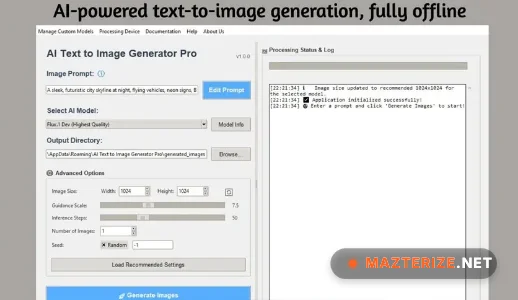
- 100% PRIVATE & OFFLINE: All processing is done locally on your PC. Your prompts and images are never uploaded to the cloud or used for training.
- CUSTOM MODEL IMPORT: Easily add any Diffusers-compatible model from the Hugging Face Hub. Provides infinite stylistic variety tailored to your specific needs.
- COMPLETE CREATIVE CONTROL: Fine-tune your art with adjustable Inference Steps, Guidance Scale, and Seed settings. Perfect for professional artists who need reproducible results.
- ONE-CLICK OPTIMIZATION: Instantly apply recommended settings for any selected model to get the best quality results without manual tweaking.
- NO SUBSCRIPTIONS: A one-time purchase that grants unlimited generations forever. Saves you hundreds of dollars compared to monthly cloud services.
ScreenShots
System Requirements for Windows (v1.2.2)
- Operating System: Windows 11 or Windows 10 version 17763.0 or higher.
- Processor: Intel Core i5 / AMD Ryzen 5 or better (i7/r7 recommended).
- RAM: 8 GB Minimum (16 GB or higher strictly recommended).
- Graphics: NVIDIA GPU with CUDA support is highly recommended for speed.
- VRAM: 4 GB Minimum (8 GB+ strictly recommended for high-resolution models like Flux).
- Storage: 10 GB+ of free space on an NVMe SSD (varies based on the number of models downloaded).
Why I Recommend This Version
To be honest, in 2026, relying on cloud-based generators that own your data or charge by the image is a waste of your creative freedom. I recommend this version because it is a robust, offline core that finally puts the power of professional AI art into the hands of the user. It’s more consistent than many open-source web-UIs that require complex Python installations, and the Custom Model Support is the best way I’ve found to stay stylistically unique. On the downside, it requires decent hardware to run effectively, and you’ll miss out on the ultra-fast speeds of massive cloud server farms. However, for any creator serious about privacy and cost-effective production, it’s a vital tool that makes AI generation feel much more personal.
Technical Details
- Software Name: AI Text To Image Generator Pro Review
- Version: 1.2.2 (March 2026 Stable)
- Developer: Independent AI Studio
- License: Professional Review (One-Time Purchase)
- Language: Multilingual
- OS: Windows (x64)