
Celemony Melodyne is a powerful digital audio pitch correction software used to measure and alter pitch in vocal and instrumental music performances. Celemony Melodyne Studio is used by a large number of professionals worldwide to fine-tune and alter audio vocals and instrumental signals. Melodyne Studio also has facilities for time-stretching, rebuilding melodies, as well as the creation of backing vocals from an existing lead vocal. It offers you all the features needed for both correction and creative applications on an unlimited number of tracks.Producers looking to enhance their guitar recordings after vocal editing may also find Native Instruments Guitar Rig Pro useful for professional amp simulation and effects processing.
Unlike traditional pitch correction plugins that process audio in real time, Melodyne analyzes recordings note by note, allowing independent adjustment of pitch, timing, vibrato, note length, amplitude, formants, sibilance, and tuning drift. The Studio edition also supports multitrack editing, making it possible to edit layered vocals, choirs, orchestral recordings, and complete instrumental arrangements from a single project. Engineers preparing final mixes may also benefit from Sonible Pure:level for intelligent loudness optimization before mastering.
Version 5.4.2.006 focuses on improving editing performance, DAW compatibility, and overall workflow efficiency. The release also refines ARA integration, enhances stability when working with large multitrack sessions, and improves processing responsiveness across modern Windows systems.
Key Features of Celemony Melodyne Studio v5.4.2.006
- Advanced Pitch Correction
Correct vocal and instrumental pitch with detailed control over individual notes while maintaining natural performance characteristics. - Direct Note Access (DNA)
Edit individual notes inside polyphonic recordings such as piano, guitar, and chords without separating tracks. - Timing & Rhythm Editing
Adjust note timing, rhythm, and performance alignment with sample-level precision. - Multitrack Editing
Edit multiple vocal and instrument tracks simultaneously within a single Melodyne project. - Formant & Vibrato Control
Modify vocal tone, formants, vibrato depth, and expression independently from pitch. - ARA Integration
Works seamlessly with compatible DAWs through ARA for faster editing without repeated audio transfers. - Audio Quantization
Align recorded performances to musical timing while preserving natural phrasing. - Broad File & Plugin Support
Supports VST3, ARA, standalone operation, and common audio file formats for professional production workflows.
What’s New in Celemony Melodyne Studio v5.4.2.006?
- Improved ARA Workflow
Version 5.4.2.006 refines ARA integration for smoother communication with supported digital audio workstations. - Enhanced Editing Performance
Large sessions containing multiple tracks respond faster during note editing and playback. - Better DAW Compatibility
Updated support improves stability with current versions of major recording applications. - Optimized Audio Processing
Improved handling of high-resolution audio projects and complex polyphonic material. - General Stability Improvements
Includes bug fixes, interface refinements, and reliability enhancements throughout the application.
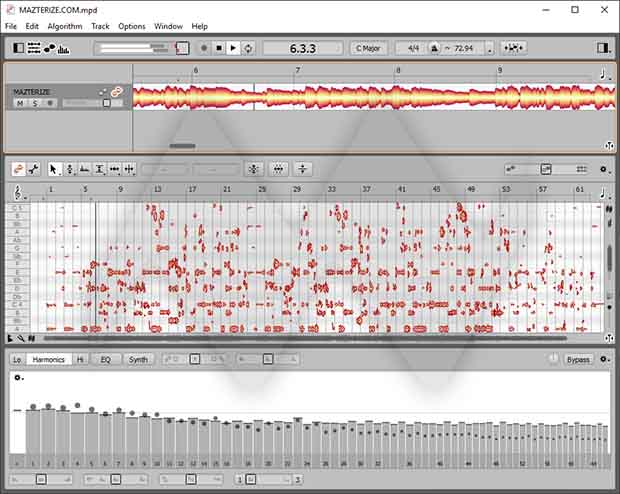
Screenshots

System Requirements
- Operating System: Windows 10 / Windows 11 (64-bit)
- Processor: Intel Core i5 / AMD Ryzen 5 or higher
- RAM: 8 GB minimum (16 GB recommended)
- Storage: 500 MB free space
- Plugin Formats: VST3, ARA, Standalone
Why I Recommend
Melodyne has become an industry standard because it offers far more than automatic pitch correction. Instead of forcing every note to the nearest scale tone, it gives you complete control over individual notes, allowing subtle adjustments that preserve the natural character of a performance. The Direct Note Access (DNA) technology is especially impressive because it can isolate and edit notes inside polyphonic recordings, making it possible to correct chords or individual notes within instruments that would normally be impossible to edit without re-recording. That level of precision is one of the reasons Melodyne is widely used in professional recording studios.
Another feature I appreciate is its transparent editing workflow. Whether you’re correcting vocal tuning, tightening harmonies, adjusting timing, reducing excessive vibrato, or refining instrumental performances, the edits remain highly musical rather than sounding artificial. The Studio edition also stands out for multitrack editing, making it practical for producers working with layered vocals, orchestral arrangements, or complex recording sessions. Combined with strong ARA integration and broad DAW compatibility, it fits naturally into modern music production workflows without slowing down the creative process.
While beginners can certainly use Melodyne for basic vocal correction, its greatest strength lies in the level of detailed control it provides to experienced producers and recording engineers. Whether you’re preparing commercial releases, restoring performances, producing podcasts, or editing film soundtracks, Melodyne Studio remains one of the most capable and respected audio editing applications available today. Users interested in similar software can browse the complete collection of audio software.
You May Also Like
Technical Details
- Software Name: Celemony Melodyne Studio
- Version: 5.4.2.006
- Developer: Celemony Software GmbH
- License Type: Premium
- Supported OS: Windows
Download Information
Download | Size: 137.07 MB | Pass: Mazterize.net

Hello, can you crack GNlauncher from GNbots?
i will try to provide thanks
Thank you so much
Any updates sir?