

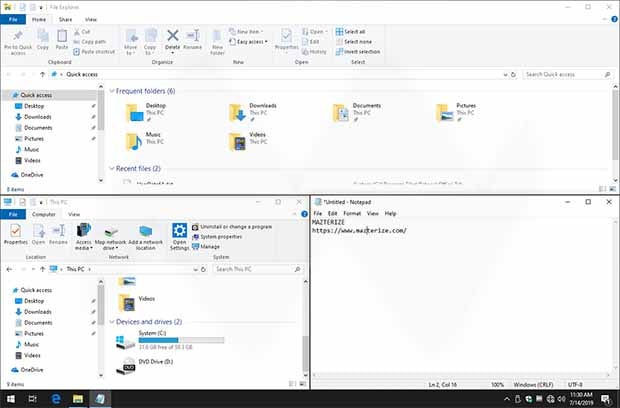
AquaSnap Pro 1.24.1 is a powerful desktop window management utility that enhances Windows multitasking by making it easier to organize, resize, snap, and arrange application windows.AquaSnap Professional features Window Docking, Window Snapping, Window Stretching, Window tiling, Window Shaking, Keyboard and Mouse shortcuts, Move windows together as well as Multi-monitor. You can put two windows side-by-side, resizing one of them then will also resize the other one, and modify the layout of several tiled windows with ease, and more.Users who want additional Windows optimization tools may also find Ashampoo WinOptimizer useful for improving overall system performance and maintenance.
Unlike the basic Snap Assist feature built into Windows, AquaSnap adds advanced window docking, tiling, stretching, snapping, transparency, and multi-monitor management capabilities. It allows users to resize windows by dragging edges, align applications with precision, create custom layouts, and keep important windows always visible while reducing desktop clutter. Developers and power users looking for additional productivity software can also explore VMware InstallBuilder Enterprise for professional software deployment and development workflows.
Version 1.24.1 improves compatibility with the latest Windows updates, enhances multi-monitor support, refines snapping behavior, and introduces performance optimizations for smoother window management. The release also includes bug fixes and interface improvements that make everyday multitasking even more responsive.
Key Features of AquaSnap Pro 1.24.1
- Advanced Window Snapping
Snap application windows to screen edges, corners, and custom positions with greater flexibility than standard Windows snapping. - Window Docking
Dock multiple windows together so they move and resize simultaneously while maintaining their layout. - Multi-Monitor Support
Efficiently organize windows across multiple displays for improved productivity. - Window Stretching
Resize windows quickly by dragging edges while automatically adjusting their dimensions. - AquaShake
Shake an active window to minimize surrounding windows and focus on the current task. - Window Transparency
Make inactive windows transparent to reduce desktop distractions while keeping them visible. - Custom Keyboard Shortcuts
Control window positioning and layout using configurable hotkeys for faster workflow. - Always-on-Top Management
Keep important applications visible above other windows for quick access during multitasking.
What’s New in AquaSnap Pro 1.24.1?
- Improved Windows Compatibility
Version 1.24.1 adds better support for the latest Windows 10 and Windows 11 updates. - Enhanced Multi-Monitor Handling
Window positioning and snapping are more consistent across complex multi-display setups. - Optimized Snapping Performance
Improved responsiveness when resizing, docking, and arranging application windows. - Better Stability
Memory management and background processing have been refined for smoother daily operation. - General Bug Fixes
Includes maintenance updates and interface improvements to enhance the overall user experience.
ScreenShots

Minimum Requirements
- Windows 7/ 8/ 8.1/ 10 (32-bit or 64-bit – all editions)
- 500 MHz or faster processor
- 512 MB RAM (memory)
- 20 MB free hard disk space
- 1024 x 768 display
Why I Recommend
If you regularly work with several applications at once, constantly resizing and arranging windows can become surprisingly time-consuming. AquaSnap Pro solves that problem by adding intelligent window management features that go well beyond the standard Windows Snap function. Docking related windows together, snapping them into custom layouts, and quickly resizing them with simple mouse gestures creates a much smoother workflow, especially on large or multi-monitor setups. These small improvements save time throughout the day and make desktop organization feel much more natural.
Another feature I appreciate is that AquaSnap remains lightweight while offering extensive customization. Users can choose exactly which snapping behaviors, keyboard shortcuts, transparency effects, and window actions they want without affecting overall system performance. Features like AquaShake, Always-on-Top management, and custom snapping zones are particularly useful for programmers, designers, office workers, and anyone who frequently switches between documents, browsers, spreadsheets, and communication tools.
Although Windows includes basic multitasking features, AquaSnap Pro significantly expands what’s possible without making the desktop more complicated. For users who spend long hours working with multiple applications, it provides an effective balance of productivity, flexibility, and ease of use. Users interested in similar software can browse the complete collection of system tools.
You May Also Like
Technical Details
- Software Name: AquaSnap Pro
- Version: 1.24.1
- Developer: Nurgo Software
- License Type: Premium
- Supported OS: Windows
Download Information
Download | Size: 3.13 MB | Pass: Mazterize.net
