

Qimage Ultimate is a powerful, easy to use and advanced photo printing software that allows viewing, editing, and printing digital pictures. Qimage Ultimate enhance your images and correct various ways and modify them using a wide variety of functions. The program features image editing and file operations, allows us to customize layouts, personalize and enhance images, make improvements to brightness, contrast or sharpness, resolution and auto-correct, and so much more.Whether you’re printing family photos, large-format landscapes, wedding albums, fine art, or commercial projects, the software maximizes image quality while simplifying the printing workflow. If you edit your photos before printing, ON1 Photo RAW provides advanced RAW editing and non-destructive photo adjustments.
This software blends incredible performance and power with a comprehensive user interface that was specially designed for photo printing purposes. The program lets you easily navigate through print jobs, quickly size your photos, correct and enhance them. By using this tool you will be able to increase your productivity and save precious time without compromising quality and control.Users who want to enlarge photos before large-format printing can also explore Topaz Gigapixel AI Pro for AI-powered image upscaling while preserving fine details.
It is the most frequently recommended batch photo printing software used by everyone from amateur shooters to professional photographers. Qimage Ultimate offers you a streamlined UI that simplifies all your print jobs, but this software also offers a variety of sophisticated tools for professional photographers. It supports advanced printing and logging, color management, 3D photo and RAW handling features, and more.
Key Features of Qimage Ultimate 2023.101
- Professional Photo Printing
Produce high-quality photographic prints using advanced interpolation and print optimization technology. - Smart Image Interpolation
Automatically resample images for sharper large-format prints with minimal quality loss. - Automatic Print Layouts
Arrange multiple images efficiently on a single page while minimizing paper waste. - ICC Color Management
Supports professional ICC printer profiles for accurate color reproduction across different printers and paper types. - Batch Printing
Print large collections of photographs with consistent settings and automated workflows. - Image Browser & Organizer
Browse, rate, organize, and manage photo libraries directly within the application. - RAW Image Support
Open and print RAW files from many popular DSLR and mirrorless camera manufacturers. - Custom Templates & Contact Sheets
Create personalized print layouts, photo packages, contact sheets, greeting cards, and collage-style prints.
What’s New in Qimage Ultimate 2023.101?
- Improved Print Engine
Version 2023.101 enhances print rendering for more accurate detail and smoother image scaling. - Expanded Printer Compatibility
Updated support for newer Epson, Canon, HP, and other compatible photo printers. - Better Memory Management
Improved handling of large, high-resolution image files during print preparation. - Enhanced Workflow Performance
Batch printing and project loading have been optimized for faster operation. - General Bug Fixes & Stability Improvements
Includes maintenance updates, interface refinements, and compatibility improvements for modern Windows systems.
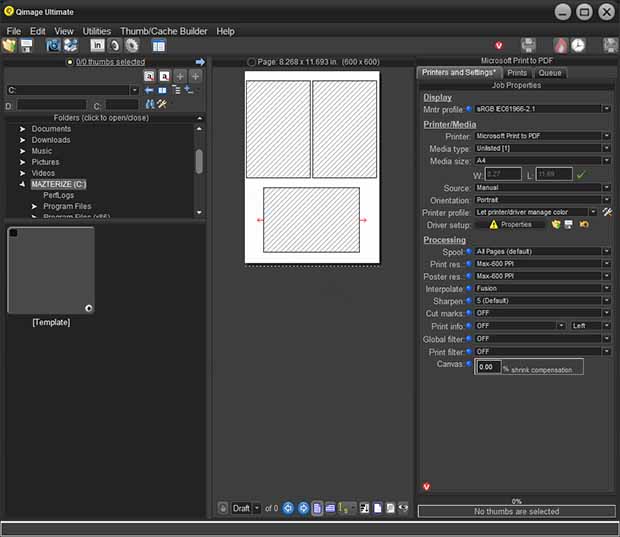
ScreenShots

Minimum Requirements
- Windows 7/ 8/ 8.1/ 10 (32-bit or 64-bit – all editions)
- 1 GHz or faster processor
- 512 MB RAM (memory)
- 30 MB free hard disk space
- 1024 x 768 display
Why I Recommend
Most photo editing applications include basic printing features, but printing is rarely their primary focus. Qimage Ultimate is different because it is built specifically to maximize print quality. Its intelligent interpolation technology prepares images for the printer’s native resolution instead of relying solely on the printer driver, often producing sharper details and smoother gradients in large-format prints. This becomes especially noticeable when printing exhibition photos, portraits, landscapes, or fine art where every detail matters.
Another feature I appreciate is the software’s efficient print workflow. Instead of manually positioning every image on a page, Qimage automatically creates optimized layouts, reducing paper waste while maintaining consistent spacing and sizing. Combined with ICC color profile support, batch printing, RAW compatibility, and customizable templates, it becomes a practical solution for photographers who regularly print albums, client proofs, portfolios, or commercial photography projects. The image browser also makes organizing large collections much easier before sending them to the printer.
While casual users may be satisfied with standard printing utilities, photographers who frequently produce high-quality prints will benefit from the additional control that Qimage Ultimate provides. Its emphasis on image quality, color accuracy, and workflow efficiency has made it a trusted tool among professional photographers and print studios for many years. Users interested in similar software can browse the complete collection of photo editing.
You May Also Like
Technical Details
- Software Name: Qimage Ultimate
- Version: 2023.101
- Developer: ddisoftware, Inc.
- License Type: Premium
- Supported OS: Windows
Download Information
Download | Size: 21.53 MB | Pass: Mazterize.net
