

Topaz AI Gigapixel is an advanced photo resampling, resizing, and enlarging software that can help you resize and enlarge the image without losing quality. Topaz A.I. Gigapixel is a fantastic tool to resize and modernize your old photo from your archive with a higher size and pixel. So you can get your old photos to be printed in large format, of course with very high detail, the same thing as you capture high-resolution photos. Gigapixel AI uses deep learning models trained on millions of images to reconstruct missing details and create sharper enlargements. If you’re editing photographs after upscaling, ON1 Photo RAW provides a complete RAW editing workflow with advanced color correction and layer-based editing.
Whether you’re restoring old family photographs, preparing images for large-format printing, improving AI-generated artwork, or enlarging low-resolution product photos, Gigapixel AI offers several AI models optimized for different image types. Portraits, landscapes, wildlife photography, illustrations, compressed JPEGs, and scanned images each benefit from specialized processing that attempts to preserve natural textures instead of simply stretching pixels. Designers who work with creative assets may also find Nik Collection by DxO useful for adding professional color grading and photographic effects after image enhancement.
Version 8.4.4 continues refining AI upscaling quality, improving GPU acceleration, and expanding compatibility with newer graphics hardware. The release also includes workflow improvements that make processing large batches of high-resolution images faster and more reliable.
Key Features of Topaz AI Gigapixel Pro 8.4.4
-
- AI Image Upscaling
Increase image resolution by up to 16× while reconstructing fine details using machine learning models. - Multiple AI Processing Models
Choose specialized models for Standard, High Fidelity, Low Resolution, Art & CG, and compressed images. - Face Recovery
Improve facial detail and sharpness when enlarging portraits or older photographs. - Batch Image Processing
Upscale hundreds of images in one session without repeating manual adjustments. - RAW Image Support
Process RAW files from supported cameras while maintaining image quality. - GPU Acceleration
Uses NVIDIA, AMD, and supported Intel graphics hardware to speed up AI processing. - Standalone & Plugin Workflow
Works as a standalone application and integrates with Adobe Photoshop and Lightroom Classic. - Preview Comparison
Compare AI models side by side before exporting the final image.
What’s New in Topaz AI Gigapixel Pro 8.4.4?
- Improved AI model accuracy for recovering fine textures in low-resolution photographs.
- Better GPU optimization to reduce processing times on newer graphics cards.
- Enhanced facial reconstruction when enlarging portrait photography.
- Improved batch processing stability for large image collections.
- General bug fixes, memory optimizations, and compatibility updates for current Windows systems.
- AI Image Upscaling
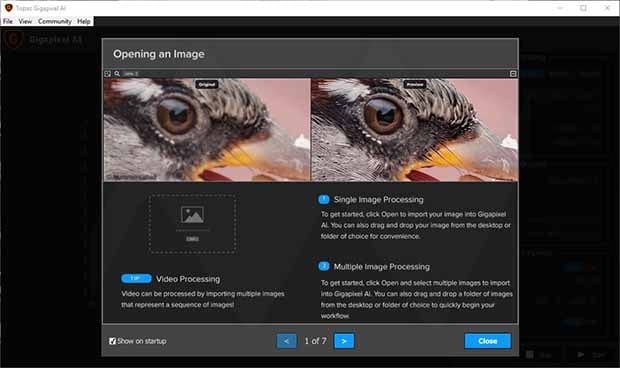
ScreenShots
Minimum Requirements:
- Windows 7/ 8/ 8.1/ 10 (64-bit only – all editions)
- 3.0 GHz or faster processor
- 8 GB RAM (memory)
- 1 GB free hard disk space
- 2 GB VRAM (2 GB recommended)
- OpenGL 3.3 or above
- 800 x 600 display
Why I Recommend
Upscaling images used to mean accepting softer edges and visible artifacts because traditional software simply stretched existing pixels. Gigapixel AI approaches the problem differently by analyzing image content and rebuilding missing detail through trained AI models. While no software can recreate information that never existed, the results are often noticeably better than standard resizing methods, particularly when working with photographs destined for print, large displays, or commercial projects.
I especially like how the application lets you choose different AI models depending on the type of image you’re processing. A scanned family photograph doesn’t need the same treatment as a digital illustration or an AI-generated artwork, and Gigapixel recognizes that. The side-by-side preview also makes it easy to compare results before committing to a lengthy export. Batch processing is another strength because photographers and designers frequently need to enlarge dozens or even hundreds of images at once.
It’s worth remembering that Gigapixel AI performs best when the original image still contains usable detail. Extremely compressed or heavily damaged files have limits that no AI model can completely overcome. Even so, for photographers, designers, print professionals, and anyone regularly working with low-resolution images, Gigapixel AI remains one of the strongest dedicated upscaling tools currently available. Users interested in similar software can browse the complete collection of photo editing.
You May Also Like
Technical Details
- Software Name: Topaz AI Gigapixel Pro
- Version: 8.4.4
- Developer: Topaz Labs
- License Type: Premium
- Supported OS: Windows
Download Information
Download | Size: 497.02 MB | Pass: Mazterize.net

min linknya kok speed nya cuman , terimakasih sebelumnya min
min linknya kok speed nya cuman 20 kb bisa minta tolong di upload di host lain mungkin min seperti mega misalnya , terimakasih sebelumnya min
you can download from link given below with password thanks
can i ask a different server for download this software, cause this server is limit
Try Again later it will be ok Thanks