
O&O SafeErase Professional 21.3.26142 is a secure data erasure utility designed to permanently remove sensitive files, folders, partitions, and entire storage devices from Windows computers. Unlike normal file deletion, which only removes references to data, SafeErase overwrites storage sectors using recognized erasure methods, making deleted information significantly more difficult to recover with forensic recovery software. It is widely used by businesses, IT departments, technicians, and privacy-conscious users who need to dispose of confidential information before selling, recycling, or repurposing storage devices. If you also want to protect important files before deleting them, GiliSoft Private Disk provides encrypted virtual storage for sensitive documents.
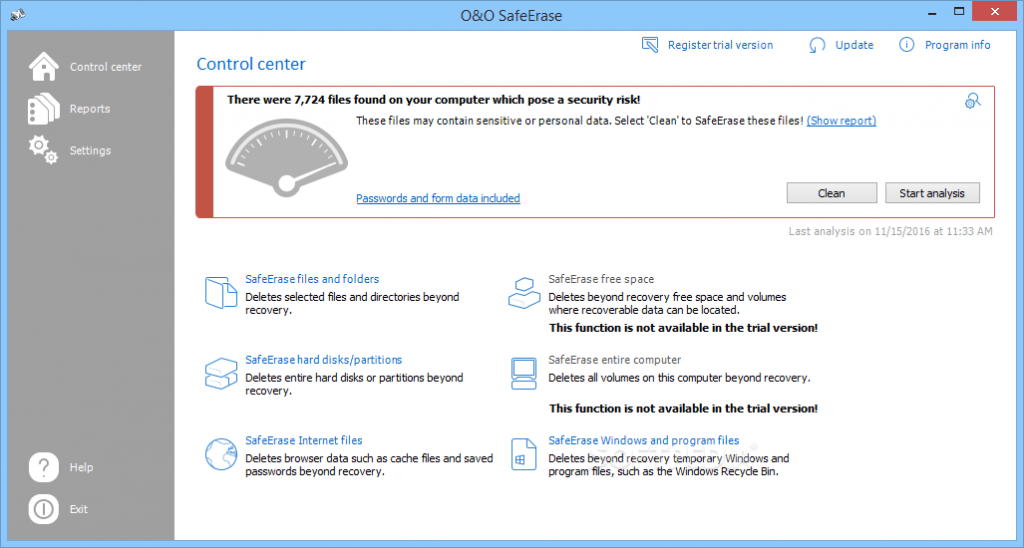
Beyond securely deleting individual files, the software can erase free disk space, wipe complete partitions, clean SSDs and HDDs, remove browser traces, and securely delete temporary Windows data that may contain personal information. Multiple overwrite standards are available, allowing users to choose between faster deletion methods or more thorough erasure techniques depending on their security requirements. Users managing storage devices before upgrading hardware may also find MiniTool Partition Wizard Pro Ultimate useful for partition management and disk migration.
Version 21.3.26142 improves Windows compatibility, expands support for modern storage devices, and refines secure deletion performance while maintaining compliance with established data sanitization methods.Your instruments, music, photos, videos, notes, and other confidential documents can be easily recovered if fall into the wrong hands. As we know, deleting files does not mean the files are permanently deleted, even formatting the hard drives is not enough to permanently delete (destroy) data. O&O SafeErase 21 is an advanced tool to permanently deletes your confidential files without the possibility to be recovered even when using the best data recovery software.
Key Features of O&O SafeErase Professional 21.3.26142
- Secure File Deletion
Permanently erase individual files and folders using multiple overwrite algorithms. - Complete Drive & Partition Wiping
Erase entire hard drives, SSDs, USB drives, and partitions before disposal or reuse. - Free Space Cleaning
Overwrite previously deleted data remaining in unused disk space without affecting existing files. - Multiple Erasure Standards
Supports recognized overwrite methods including DoD 5220.22-M, Gutmann, and other secure deletion algorithms. - Internet Trace Removal
Delete browser history, cookies, cache files, and temporary internet data from supported browsers. - Windows Privacy Cleanup
Remove temporary files, recent document lists, logs, and other traces created during normal Windows usage. - Scheduled Secure Deletion
Automate routine cleanup tasks using configurable schedules. - SSD-Aware Operations
Supports secure deletion workflows while recognizing the characteristics of modern solid-state drives.
What’s New in O&O SafeErase Professional 21.3.26142?
- Improved compatibility with recent Windows 11 and Windows 10 updates.
- Enhanced support for modern NVMe SSDs and high-capacity storage devices.
- Optimized secure deletion performance during large disk wipe operations.
- Updated privacy cleanup modules to recognize additional Windows system traces.
- General stability improvements, interface refinements, and bug fixes.
Screenshots

Minimum Requirements
- Windows 7/ 8/ 8.1/ 10 (32 bit or 64-bit – all editions)
- 1 GHz or faster processor
- 512 MB RAM (memory)
- 40 MB free hard disk space
- 1024 x 768 display
- .Net Framework 4.6.1
Why I Recommend
Deleting a file in Windows doesn’t actually remove its contents—it simply marks the space as available for future use. Until new data overwrites that space, recovery software can often restore documents, photos, spreadsheets, and other files that users believed were gone. That’s why secure erasure software still plays an important role, particularly when selling a computer, returning leased equipment, disposing of old storage devices, or handling confidential business information. O&O SafeErase is built specifically to solve that problem by overwriting data using recognized sanitization methods instead of relying on standard deletion.
What I like about SafeErase is that it isn’t limited to wiping entire drives. Many users only need to permanently remove selected files, browser history, temporary Windows data, or previously deleted information hiding in free disk space. The software allows you to choose the appropriate level of cleanup for each situation, whether you’re preparing a single document for permanent removal or securely erasing an entire storage device before recycling it. The scheduling options are also useful for organizations that routinely handle sensitive information and want to automate privacy maintenance.
It’s important to remember that secure deletion is irreversible. Once data has been overwritten successfully, normal recovery software cannot bring it back, so verifying backups before running an erase operation is essential. Used carefully, however, O&O SafeErase Professional provides one of the most reliable ways to protect sensitive information from unauthorized recovery. Users interested in similar software can browse the complete collection of antivirus & security.
You May Also Like
Technical Details
- Software Name: O&O SafeErase Professional
- Version: 21.3.26142
- Developer: O&O Software
- License Type: Premium
- Supported OS: Windows
Download Information
Download | Size: 62.65 MB | Pass: Mazterize.net
