

Equalizer APO 1.4.2 is a free, open-source audio equalizer software designed specifically for Windows users who want complete control over their computer’s sound system. Unlike typical equalizers that come with limited functions, Equalizer APO offers advanced sound processing capabilities that enhance and customize audio output at a system-wide level. It’s lightweight, efficient, and runs in the background with minimal CPU usage, making it perfect for both casual users and audiophiles who want to achieve professional-grade sound without any performance drop.
The standout additions in version 1.4.2 include a native Qt-based Device Selector and full ARM64 support for Copilot+ PCs. These updates provide surgical precision when mapping filters to specific hardware, much like the advanced driver management found in cFosSpeed for network traffic. Furthermore, the updated engine now supports Double Precision (64-bit) audio processing through community-driven builds, significantly boosting fidelity for complex room-correction setups.
Equalizer APO 1.4.2 is a must-have tool for users looking to improve audio quality without spending money on premium hardware or paid software. It supports real-time sound adjustments, channel routing, and advanced features like VST plugin integration for professional audio control. Whether you’re a gamer wanting immersive soundscapes, a musician working on mixing and mastering, or simply someone who wants cleaner, balanced sound, Equalizer APO delivers powerful results. With its open-source nature, low system impact, and vast customization options, it stands as one of the best free sound equalizers available for Windows.
Common Issues & Troubleshooting
- APO Not Working After Windows Update: Major Windows 11 builds (like KB5078127) can reset the audio infrastructure. Fix: Open the “Device Selector” (the new Qt replacement for the Configurator), select your device, and surgically toggle the “Install as SFX/EFX” option. Tip: Always reboot after applying these changes to re-initialize the audio service.
- ASIO/WASAPI Exclusive Mode Conflict: Equalizer APO operates at the system-effect level. Warning: Applications using ASIO or WASAPI Exclusive mode surgically bypass the Windows APO chain. Use a wrapper like Hi-Fi Cable or stick to standard Shared Mode to ensure your filters are applied.
- VST Plugin Interface Not Loading: Some 64-bit VSTs may fail to render their GUI. Fix: Ensure the plugin is surgically installed in a path without restricted permissions. Version 1.4.2 includes improved VST2/VST3 stability, but older plugins may still require the “Embedded” mode toggle in the Configuration Editor.
Key Features of Equalizer APO
- System-Wide Equalizer – Works on all sound output devices including speakers, headphones, and sound cards.
- Unlimited Filters – Add and adjust as many filters as needed for precise sound customization.
- Low CPU Usage – Lightweight design ensures smooth performance with no lag or distortion.
- Peace GUI Support – Compatible with Peace GUI for a user-friendly visual interface.
- Real-Time Audio Adjustment – Hear sound modifications instantly without restarting the system.
- VST Plugin Compatibility – Supports third-party plugins for professional sound editing.
- Channel Routing and Mixing – Advanced tools for 3D audio control and multichannel sound.
- Open Source and Free – Completely free with community support and regular updates.
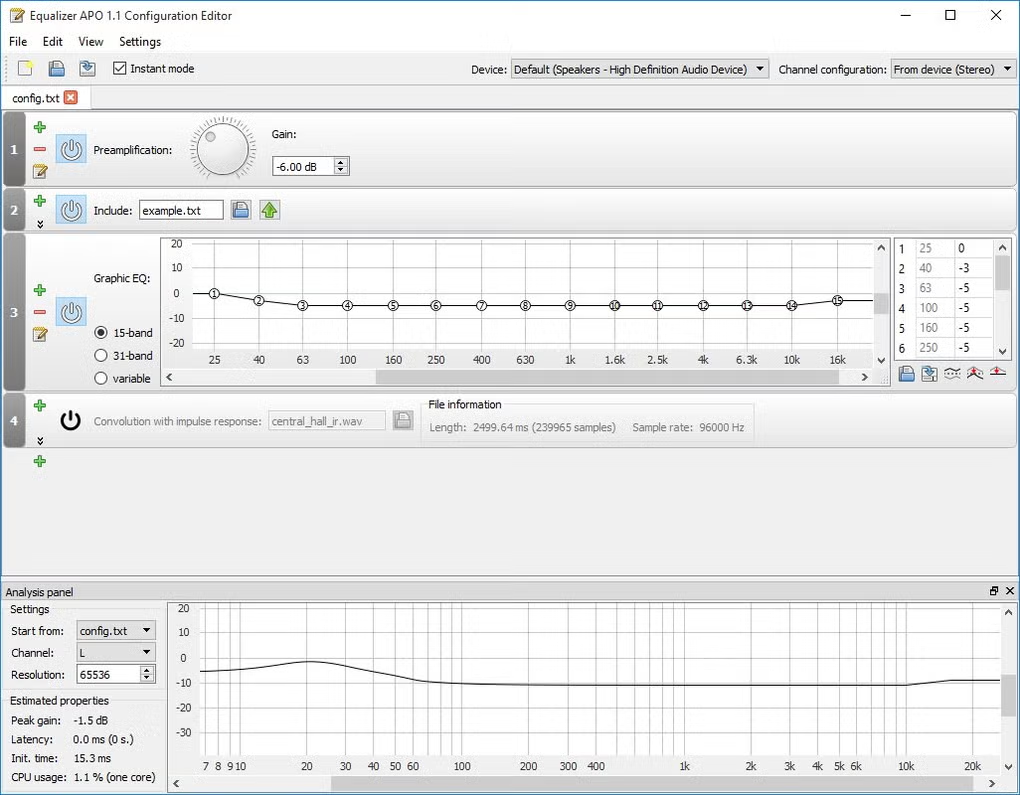
Screenshots

System Requirements
- OS: Windows Vista, 7, 8, 10, 11 (32-bit & 64-bit)
- Processor: Intel Pentium IV or later
- RAM: 512 MB minimum (1 GB recommended)
- Storage: 20 MB free disk space
- Other: Administrator rights required for installation
Other Software You May Like:
Download Information
- File Name: EqualizerAPO 1.4.2 Setup
- Version: 1.4.2
- License: Freeware / Open Source
- Developer: Jonas Thedering
- Setup Type: Offline Installer / Full Setup
- Compatibility: Windows Vista/7/8/10/11 (32-bit & 64-bit)
Summary
Equalizer APO 1.4.2 is a powerful yet lightweight sound equalizer for Windows that delivers studio-quality audio control. With features like unlimited filters, real-time adjustments, and Peace GUI compatibility, it provides a professional-level experience for free. Ideal for gamers, musicians, and audiophiles, it ensures your PC’s sound is exactly how you want it—clear, balanced, and immersive.
Equalizer APO 1.4.2 Review 2026
Download | Size:11.43 MB | Pass: Mazterize.net
