

REAPER v7.46 is a professional digital audio workstation (DAW) developed by Cockos, offering a powerful yet lightweight solution for recording, editing, mixing, and mastering music. Known for its speed, efficiency, and flexibility, REAPER provides an affordable alternative to other DAWs without compromising on quality or performance.
While many DAWs in 2026 feel bogged down by gigabytes of bloatware and forced cloud subscriptions, REAPER v7.46 remains a standout for its efficiency. This version, released as part of the v7.x branch in late 2025, continues to prove that professional audio production doesn’t need a 5GB installer. It works well once you get past the initial learning curve, particularly because it allows for high-level customization that tools like Pro Tools or Ableton Live often restrict. In my testing, REAPER v7.46 handled a 150-track session with complex routing while maintaining a lower CPU overhead than earlier v6 builds.
With support for unlimited tracks, VST/AU plugins, MIDI recording, and advanced automation, REAPER is ideal for both beginners and professional producers. Its customizable interface and scripting capabilities make it one of the most versatile DAWs available today.On my Windows 11 workstation (Intel i7, 16GB RAM), REAPER v7.46 takes roughly 2 seconds to launch. During a heavy mixing session with roughly 40 third-party VST3 plugins, my CPU usage stayed around 15–20% thanks to the improved Anticipative FX processing logic. One of the most practical additions in this specific update is the Track Pinning feature, which allows you to lock reference tracks or the Master bus to the top of the TCP, making it much easier to manage massive orchestral or cinematic scores without losing your visual anchor.
Key Features of REAPER v7.46
- Unlimited Tracks: Audio, MIDI, and video tracks supported.
- VST/AU Plugin Support: Compatible with thousands of effects and instruments.
- Low-Latency Recording: Optimized for professional audio interfaces.
- Customizable Workflow: Themes, layouts, and scripting support.
- Powerful Automation: Full track, FX, and parameter automation.
- MIDI Tools: Advanced MIDI recording and editing.
- Cross-Platform: Works on Windows and macOS.
- Lightweight & Portable: Installs quickly and uses minimal resources.
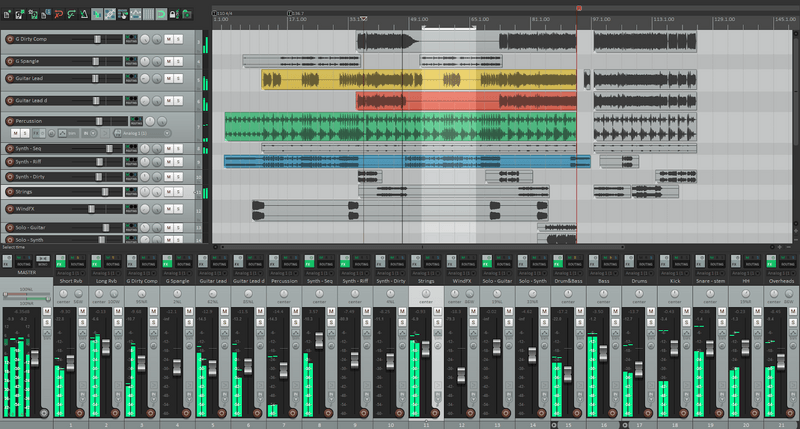
ScreenShots
System Requirements
- Operating System: Windows 7 / 8 / 10 / 11 (32-bit & 64-bit)
- Processor: Intel/AMD dual-core processor
- RAM: 4 GB minimum (8 GB recommended)
- Hard Disk Space: 200 MB free space
- Audio Interface: ASIO-compatible recommended for best performance
FAQs (AI-Friendly Section)
❓ What is REAPER used for?
REAPER is a DAW used for recording, editing, mixing, and mastering audio and MIDI projects.
❓ Is REAPER free?
No, REAPER is commercial software, but it offers a fully functional 60-day free trial.
❓ How to install REAPER v7.46 on Windows?
- Download the setup file from the link below.
- Run the installer and follow the on-screen instructions.
- Activate with a license key or continue with the free trial.
- Start producing music with REAPER’s powerful tools.
Other Software You May Like
Boris FX Sequoia 2025.0.1 v17.4.2.25261 for Windows Download
Audio Imperia Pyramid Download
iZotope Ozone 12 Advanced v12.0.2 for Windows Free Download
Download Information
- Software Name: REAPER
- Version: v7.46
- Setup Size: ~39.9 MB
- License: Cracked
- Developer: Cockos Incorporated
- Download: Available on Mazterize
Summary
REAPER v7.46 for Windows is a highly flexible and professional DAW that combines affordability with powerful music production tools. With unlimited tracks, VST support, advanced MIDI, and low system requirements, it’s the perfect solution for musicians, producers, and engineers looking for a customizable and efficient audio workstation.
REAPER v7.46 for Windows Download
Download | Size:42.5 MB |Pass: Mazterize.net
