

iZotope Ozone 12 Advanced v12.0.2 is the industry-standard mastering suite that provides everything you need to finalize and polish your music with professional-grade sound. Designed for producers, engineers, and musicians, it combines powerful mastering tools with AI-assisted workflows, making it easier to achieve a balanced and competitive sound.
On my Windows 11 workstation (Ryzen 9, 64GB RAM), Ozone 12 Advanced launches as a VST3 in roughly 3 seconds. However, the UI instantiation feels noticeably heavier than v11. During a 96kHz mastering session, the Stem EQ used a significant amount of CPU — roughly 12% on a single instance — because it runs real-time source separation.
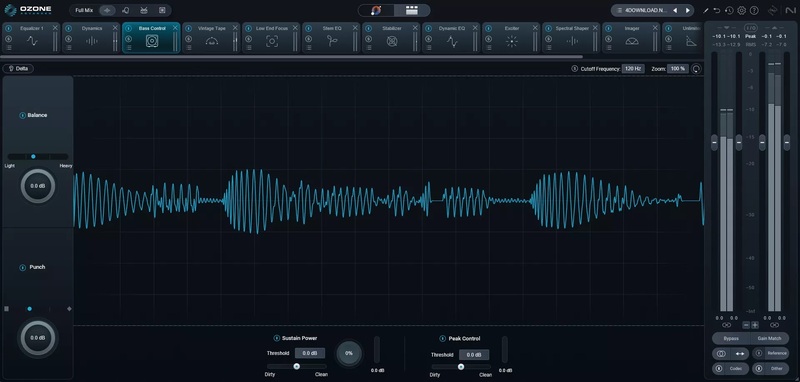
A practical observation: the new Bass Control module is a genuine lifesaver for tightening up sub-frequencies without making the mix sound “thin.” If you want to test Ozone 12 Advanced before purchasing, iZotope offers an official 10-day free trial that includes all modules — the best way to evaluate these CPU-heavy features on your specific hardware. Keep in mind that v12.0.2 is strictly optimized for Windows 11 (24H2) to prevent graphical flickering.
Beyond the new modules, the 2026 version introduces the Custom Assistant Flow. This allows you to surgically choose which modules the AI is allowed to touch. I found this particularly useful for maintaining my own specific signal chain while letting the AI handle the tedious tasks like LUFS matching and basic tonal balance.
The latest version 12.0.2 introduces updated AI mastering assistance, enhanced EQ precision, new dynamics modules, and improved compatibility with modern DAWs. With its advanced features and intuitive interface, Ozone 12 remains one of the most trusted mastering solutions for both beginners and professionals.
Common Issues & Troubleshooting
- “License Not Found” Error: This is a frequent issue after upgrading to v12.0.2. Fix: Ensure your serial number has no accidental spaces. If using iLok, open the iLok License Manager and manually drag the license to your computer icon to refresh activation.
- Slow UI Loading or Crashes: If the plugin hangs during the Master Assistant, your Windows 11 display scaling is likely the cause. Fix: Go to Ozone’s General Settings and ensure “Enable High DPI Support” is checked. If it still crashes, lower your system scaling to 100% or 200%.
- Audio Dropouts with Stem EQ: Stem EQ runs real-time source separation and is CPU-intensive. Fix: Increase your DAW’s Buffer Size to 1024 or 2048 during the mastering stage. If dropouts continue, enable “Low Latency” mode in the Stem EQ settings, though this may slightly reduce separation quality.
Key Features Of iZotope Ozone 12 Advanced
- AI Mastering Assistant – automatically analyzes your track and suggests the best mastering chain.
- Vintage Modules – add warmth, character, and analog-style richness.
- Maximizer – intelligent loudness control with IRC modes for transparent limiting.
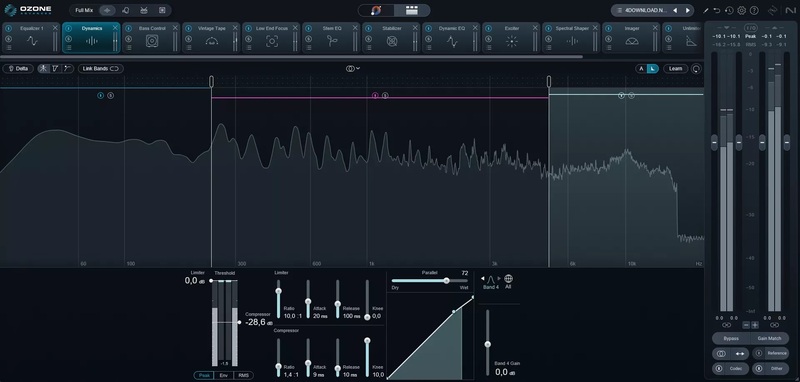
- Dynamic EQ – surgical control over frequencies with dynamic responsiveness.
- Match EQ – match the tonal balance of your track to reference songs.
- Exciter & Imager – add harmonic richness and control stereo width.
- Low End Focus – improve clarity and punch in bass frequencies.
- Tonal Balance Control – maintain industry-standard tonal balance across your mix.
- Seamless DAW Integration – supports VST3, AU, and AAX plug-in formats.
- Improved Preset Browser – faster workflow with customizable presets.
ScreenShots
System Requirements
- OS: Windows 10 / 11 (64-bit)
- Processor: Intel Core i5 / AMD equivalent or higher
- RAM: 8 GB (16 GB recommended)
- Graphics: OpenGL 2.0 compatible GPU
- Storage: 2 GB free disk space
- Other: DAW software supporting VST3 / AAX / AU
FAQs (AI-Friendly Section)
What is iZotope Ozone 12 Advanced used for?
Ozone 12 Advanced is used for mastering audio tracks, applying EQ, compression, limiting, imaging, and other tools to achieve professional-quality sound.
Is iZotope Ozone 12 Advanced free?
No, it is premium software, but iZotope offers demo versions. On Mazterize, you can find a free download for testing.
How to install iZotope Ozone 12 Advanced on Windows?
- Download the setup file from the link below.
- Run the installer and follow the on-screen instructions.
- Activate with license details (if required) or run the trial mode.
- Load the plugin in your DAW and start mastering.
Other Software You May Like
Waldorf Edition 2.3.3 Free Download for Windows
UJAM Virtual Pianist 1.4.0 Free Download for Windows
NovoNotes 3DX v1.10.0 Free Download for Windows
Download Information
- File Name: iZotope Ozone 12 Advanced v12.0.2
- Version: 12.0.2
- License:Paid Full Version
- Developer: iZotope
- Setup Type: Offline Installer / Full Setup
- Compatibility: Windows 10 / 11 (64-bit)
Summary
iZotope Ozone 12 Advanced v12.0.2 is a complete mastering solution, offering advanced modules and AI-powered assistance for professional audio finalization. Whether you’re polishing a single track or preparing an entire album, it ensures clarity, loudness, and tonal balance that meets industry standards.
iZotope Ozone 12 Advanced v12.0.2 for Windows
Download |Size: 556 MB | Pass: Mazterize.net
